AI-Powered NDIS Software: What It Actually Does (and What to Look For in 2026)
A practical guide to AI features in NDIS workforce software -- what is genuinely useful, what is marketing fluff, and what to ask vendors in 2026.
What AI features are appearing in NDIS software?
AI job summaries
After a support shift, AI can read the carer's notes, check-in and check-out times, and any incident or observation entries, then produce a short written summary of what happened during that job.
This is useful for coordinators who need to quickly understand a shift without reading through raw carer notes. It's also helpful when a client has multiple carers across a week and a coordinator needs a consistent view across all of them.
The key question to ask: does the summary appear in the client record, or just in a separate report? It should be attached to the job so the context is always findable.
AI carer daily summaries
A step further than job summaries, a daily digest gives coordinators a synthesised view of everything a specific carer did across their entire day. This is particularly useful in larger organisations where coordinators might not be across every shift personally.
Done well, this surfaces things like: a carer who checked in late across three consecutive jobs, or a carer whose notes included language that might indicate a challenging incident.
Done poorly, it's just a list of job titles with no actual synthesis. Ask to see a real example before assuming it's useful.
AI incident narrative generation
This is one of the more immediately useful AI features in NDIS software. Incident reports have two parts: structured fields (type, severity, date and time, parties involved, immediate actions taken) and a narrative section that describes what happened in coherent prose.
Most carers find writing the narrative section the hardest part, especially when they're shaken after a difficult incident and need to document quickly before memory fades.
AI narrative generation works by reading the structured fields the carer has already filled in and drafting a coherent paragraph or two that can be reviewed and edited. The carer or coordinator still owns the final text. The structured fields remain the authoritative record.
This doesn't replace clinical judgement or formal training in incident documentation. It removes the blank-page problem that causes delays and poor-quality documentation.
AI risk flag detection
This is passive AI that reads carer notes as they're submitted and flags language that might indicate a safeguarding concern, a clinical issue, or an NDIS-reportable event.
For example: a carer writes a note mentioning that a participant refused to eat and seemed distressed. The AI flags this as potentially worth coordinator review, even if the carer didn't categorise it as an incident.
This doesn't make decisions. It surfaces things for human review. The value is that it catches things that might otherwise get buried in a long feed of routine notes.
The important caveat: these systems are only as good as their training. Ask vendors what signals the model detects, what the false positive rate looks like in practice, and whether flags are surfaced to coordinators in a timely way or only in a daily report.
AI client progress summaries
For NDIS participants, progress summaries are a regular requirement. They inform plan reviews, demonstrate outcomes, and communicate with families and plan managers.
AI progress summary tools synthesise notes and job records across a chosen period (typically a month) into a structured narrative that covers: what supports were delivered, any changes in the participant's presentation, and progress toward goals.
The better implementations let coordinators select a date range, trigger generation, and then edit the output before sharing. Export to PDF is the standard expected format.
The critical rule: AI-generated progress summaries must be reviewed by a qualified person before being sent to a participant, family member, or external party. They are a drafting tool, not a compliance document. Any platform that implies otherwise is overstating the technology.
AI communications drafting
Coordinators send a lot of messages. AI communications drafting lets you describe what you want to say in plain English ("tell the carer their Thursday shift has moved to 9am and ask them to confirm") and the AI drafts the SMS or email.
This is low-stakes AI use with genuinely good time savings. The draft goes in an editable field before sending, so there's always a human review step.
What to ask NDIS software vendors about AI
1. Where does the data go? AI features require sending text to a large language model. That model may be operated by a third party (OpenAI, Anthropic, Google). Ask: is participant data sent to the model? Is it used for training? Where is it stored and processed? Check whether this is compatible with your organisation's data governance policy.
2. Is the AI output editable before it becomes a record? No AI output should be automatically committed to a client record without a human review step. If the answer is "yes it auto-saves", that's a problem.
3. What happens when the AI is wrong? It will be wrong sometimes. Ask whether incorrect outputs are logged, whether coordinators can flag a bad result, and how the vendor handles feedback.
4. Is AI an add-on cost? Some platforms include AI features in base pricing. Others charge per-use or per-seat for AI modules. Get this in writing before signing.
How Teiro approaches AI in CareOS
Teiro's CareOS includes several of the features described above: AI job activity summaries, AI incident narrative generation, AI risk flag detection, and AI client progress summaries. All AI-generated content appears in editable fields before being committed to a record. Participant data is handled in accordance with Australian privacy law.
The AI features in CareOS are designed to reduce documentation time for carers and coordinators, not to automate clinical decisions.
Progress summary generation in CareOS
The progress summary tool is accessed from the Reports tab inside a client record. Select a date range, tap Generate Summary, and the AI reads all completed jobs, carer notes, and activity entries within that period to produce a structured narrative.
!Client Reports tab showing the date range picker and Generate Summary button in CareOS
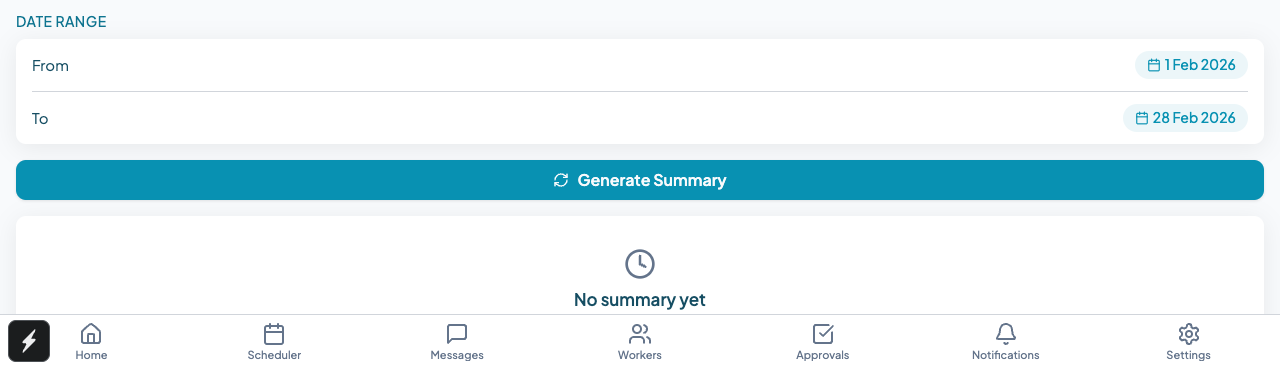
The output appears in an editable text area below the controls. Coordinators review and edit the draft before sharing it with a plan manager, family member, or for use in a plan review submission.
Job-level AI summary in CareOS
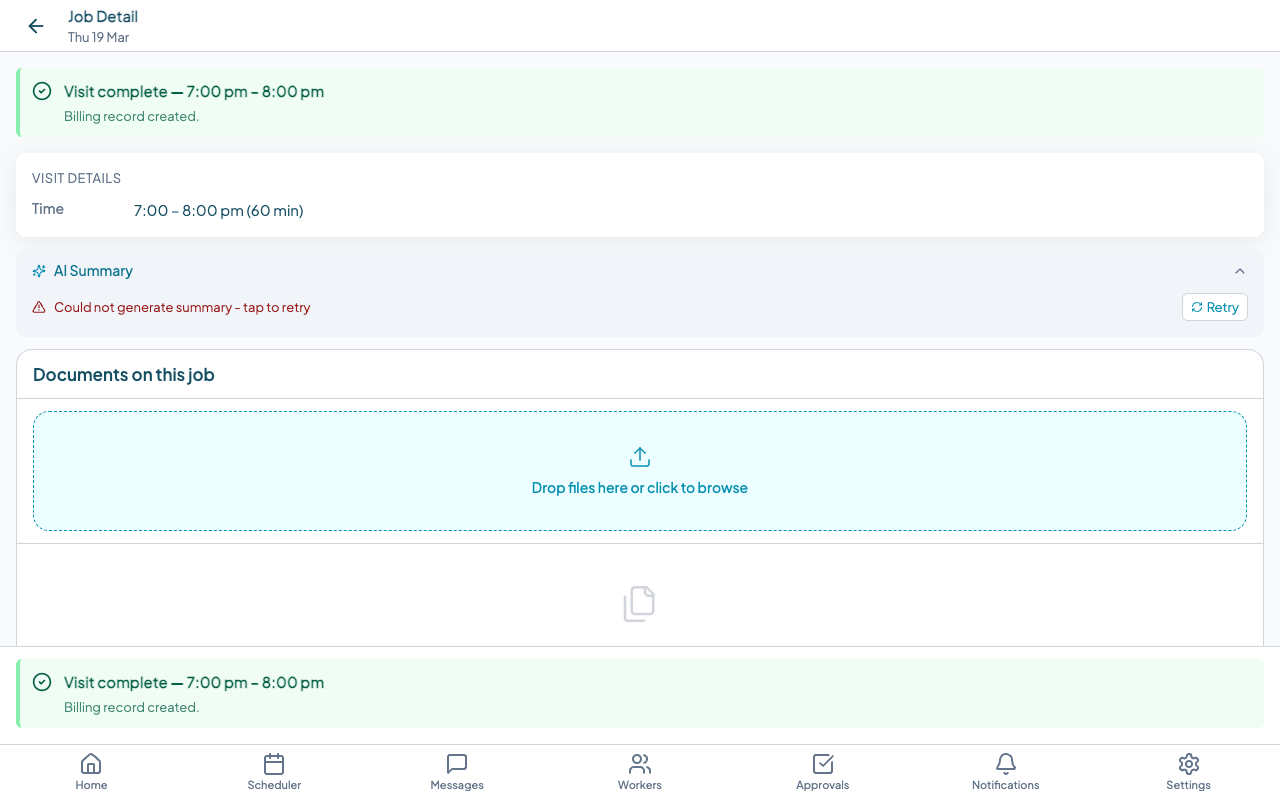
Each completed job also has an AI Summary section in the job detail view. After a shift, the AI reads the carer's notes and activity entries and produces a short summary of what occurred during that visit. This is visible to coordinators when reviewing the job record.
!Job detail screen showing Visit Details and the AI Summary section in CareOS
If you want to see how these features work in a real demonstration, book a demo or start for free with up to five users at no cost.
Frequently asked questions
Is AI-generated documentation acceptable for NDIS compliance purposes? AI-generated text that has been reviewed, edited, and signed off by a qualified staff member is acceptable as documentation. The AI is a drafting tool. The person who reviews and approves the document is responsible for its accuracy. Always include a review step in your workflow.
Can AI detect a reportable incident automatically? No. Current AI tools can flag language that may indicate a reportable event and prompt a coordinator to review it. The decision about whether something is NDIS-reportable is a human and clinical decision. No software can make that determination.
What is AI risk flag detection in practice? The AI reads carer notes as they are submitted and applies a model trained to recognise language associated with safeguarding concerns, clinical deterioration, or NDIS-reportable events. Flagged notes are surfaced to coordinators for review. The coordinator decides what action, if any, is needed.
Do I need a large organisation to benefit from AI features? No. Even a small provider with a handful of carers benefits from AI incident narrative drafting and risk flag detection. The time savings on documentation are proportional to the number of jobs, not the size of the organisation.
Are AI features in NDIS software safe for participant data? It depends on the vendor. Participant data sent to a large language model must comply with Australian privacy law and, where applicable, NDIS Practice Standards. Ask your vendor for their data processing agreement and confirm participant data is not used for AI model training.