
Why NDIS Claims Get Held Before Submission -- and What Each Hold Means
The specific checks a billing system should run before sending anything to NDIA -- and what to do when a claim is flagged. For billing officers clearing a queue.
Why holds exist
A pre-submission hold is a claim line that the billing system has flagged as having a problem that should be resolved before it is sent to NDIA, a plan manager, or a participant. Holds are not failures -- they are the system catching something that would otherwise result in a rejection, a compliance finding, or an incorrect payment.
Without pre-submission hold logic, bad claims flow through to submission. NDIA rejects them on their end or -- worse -- pays them and raises a compliance issue later. A hold at the billing run stage is recoverable. A rejection or audit finding after the fact is not.
The six holds described below are the conditions that Teiro checks before a claim line can move to submission status. Each has a specific cause and a specific resolution path.
Hold 1: No active service agreement
What it means. In Teiro's billing module, this hold means the participant has no current service agreement as of the service date on this claim line. Either the SA has expired, the SA has not yet been created, or the SA start date is after the service date.
What causes it. SA expiry is the most common cause. Coordinators sometimes continue delivering services after an SA end date because the renewal is in progress. The billing system has no way to distinguish "SA renewal pending" from "SA genuinely lapsed" -- it checks dates only.
How to resolve it. If the SA has been renewed and the renewal agreement is not yet in Teiro, create it now with the correct dates and rates. Once the active SA covers the service date, the hold will clear automatically on the next billing run calculation. If no SA was ever in place for these services, the lines cannot be submitted and should be removed from the run.
Hold 2: No SA line covering the activity type
What it means. A service agreement exists for this participant, but it does not include a line item for the support category of this shift. The SA may cover Core Supports but not Capacity Building, for example, and a Capacity Building shift has been delivered.
What causes it. Support categories are set up on the SA when it is created. If the participant's plan includes a support category that was not added to the SA at setup time, any shifts in that category will be held. This can also happen when a participant's plan is amended mid-year to add a new support category, but the SA is not updated to reflect it.
How to resolve it. Open the participant's SA and add the missing line item with the correct support item code, agreed rate, and budget cap. If the support category is not funded in the participant's plan, the shift cannot be billed and should be removed from the run.
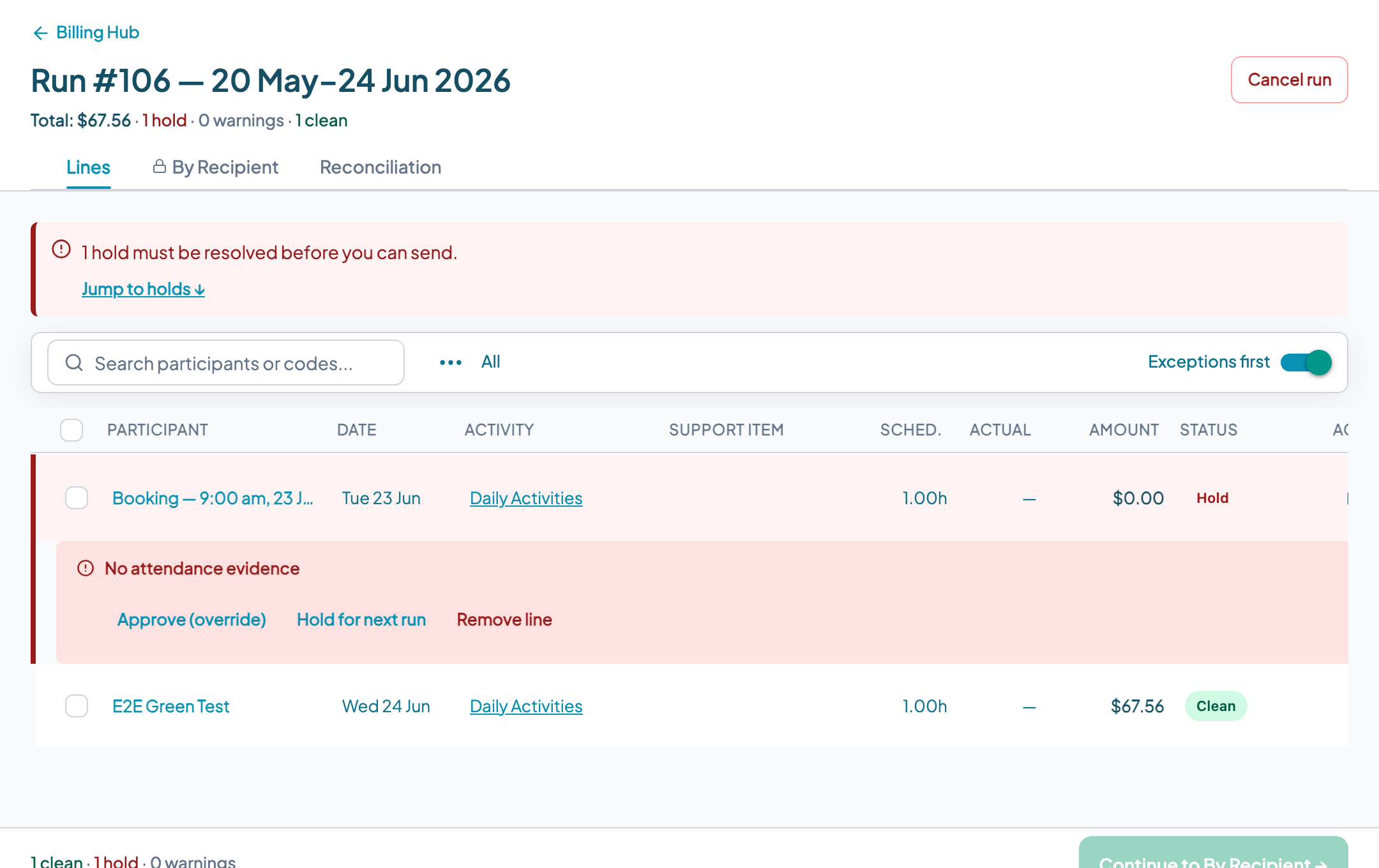
Hold 3: No attendance evidence
What it means. The shift has no check-in or check-out record. The system cannot confirm attendance was captured for this service.
What causes it. The worker did not check in or out via the mobile app. This happens when workers forget, when there are connectivity issues, or when shifts are entered manually by a coordinator without the worker completing the mobile workflow.
How to resolve it. If the service was genuinely delivered, a coordinator can manually record attendance from the shift record, noting the reason for the manual entry. This creates an audit trail. If the service was not delivered, the line should be removed from the run. Do not resolve this hold by marking attendance if the service did not occur.
Hold 4: Expired worker screening at time of service
What it means. The worker assigned to this shift had an expired or lapsed NDIS Worker Screening Check on the date the shift was delivered.
What causes it. A worker's screening check expired between the time they were rostered and the time the shift was delivered. This is the most serious hold from a compliance standpoint. The NDIS (Worker Screening) Rules require that workers in risk-assessed roles hold a current check. Not every worker in every role requires a clearance, but where a role is risk-assessed, a lapsed or absent check is a compliance breach.
How to resolve it. This hold cannot be resolved by the worker obtaining a new check. The problem is that the service was delivered while the check was lapsed, not that the check is currently lapsed. In most cases, lines under this hold should not be submitted to NDIA. The organisation should document the incident and review its screening monitoring process. Organisations using Teiro should ensure worker screening expiry alerts are configured so this situation is caught before the shift is delivered, not at billing time.
Hold 5: Possible duplicate
What it means. A claim line for the same participant, support item code, and service date already appears in a previous billing run.
What causes it. Billing runs sometimes overlap in date range. A shift that was included in the tail end of last month's run may also appear in this month's run if the date ranges were not set carefully.
How to resolve it. Compare the held line against previous billing runs for this participant. If the shift was already billed and paid, remove the line from the current run. If the previous billing run was created but the line was not successfully submitted (e.g. it was held and ultimately removed), and this is a genuinely new submission attempt for the same shift, the hold can be manually overridden with a note explaining the situation.
Hold 6: Cancellation not billable
What it means. The shift was recorded as a participant cancellation but the circumstances do not meet the NDIS Pricing Arrangements criteria for a short-notice cancellation (SNC) claim.
What causes it. Teiro applies a 7 clear day notice window -- a cancellation is short notice if the participant gives less than 7 clear days before the scheduled start. The cancellation may fall within that window but still not be billable if the specific cancellation reason, the participant circumstances, or the provider's internal process does not satisfy the SNC billing rules. Not all cancellations within the notice window are billable -- the Pricing Arrangements set conditions.
How to resolve it. Review the cancellation circumstances against the current NDIS Pricing Arrangements. If the criteria are met and the hold was applied in error, document the basis for the claim and release the hold manually. If the criteria are not met, the line cannot be claimed and should be removed from the run.
Note: even valid short-notice cancellations are subject to a per-participant claiming cap under the NDIS Pricing Arrangements. Check the current Pricing Arrangements for the applicable limit -- claiming beyond this cap is a known compliance audit trigger.
When to override a hold manually
Manual override is available for holds that are the result of data issues rather than genuine compliance problems. The appropriate use of override is when you have confirmed the underlying issue does not reflect an actual compliance risk and you have documented your reasoning.
Manual override is not appropriate for: expired worker screening holds, genuine duplicate lines, or non-billable cancellations. These holds exist because the claim should not be submitted, not because the data needs a correction.
Every manual override should include a note explaining why the hold was released. This creates an audit trail that protects the organisation if the submission is later reviewed.
Book a demo to see Teiro's hold logic in action, or sign up free for organisations with 5 or fewer active users.