
Billing
Completed shifts become claim-ready lines automatically.
Teiro generates your billing run from the shifts that have already been completed and verified. Catch the errors before they reach the NDIA. Send the right invoice to the right party. Reconcile payments without a second spreadsheet.
Running a small team? Free for under 5 users - no credit card, no time limit.
No more fortnightly reconciliation spreadsheet
Billing runs generate from completed shifts in a date range. The line items are already there — pulled from the shift record, matched against the service agreement, rated at the correct SCHADS band. Your billing officer reviews and approves, not re-keys.
Problematic claims held before submission
Lines with issues are held automatically, not sent, not silently dropped. No attendance evidence, no active service agreement, expired worker screening: each one is flagged with a reason so you can resolve it or make a deliberate decision to exclude it. A rate over the NDIS price guide cap is handled differently: Teiro caps it to the maximum automatically and bills at that rate, flagging the line with a warning rather than a hold.
Routes correctly by management type
NDIA-managed claims export as a bulk payment request CSV ready for the NDIA portal. Plan-managed participants get an invoice to their plan manager. Self-managed participants get an invoice directly. Teiro applies the right output based on how each participant's funding is set up.
Reconciliation without a second spreadsheet
Import the remittance or payment file from the NDIA or plan manager. Teiro matches payments back to claim lines automatically. You see what was paid, what is still outstanding, and where the amounts diverge — without manually cross-referencing two documents.
Demo video
A real billing run, start to finish
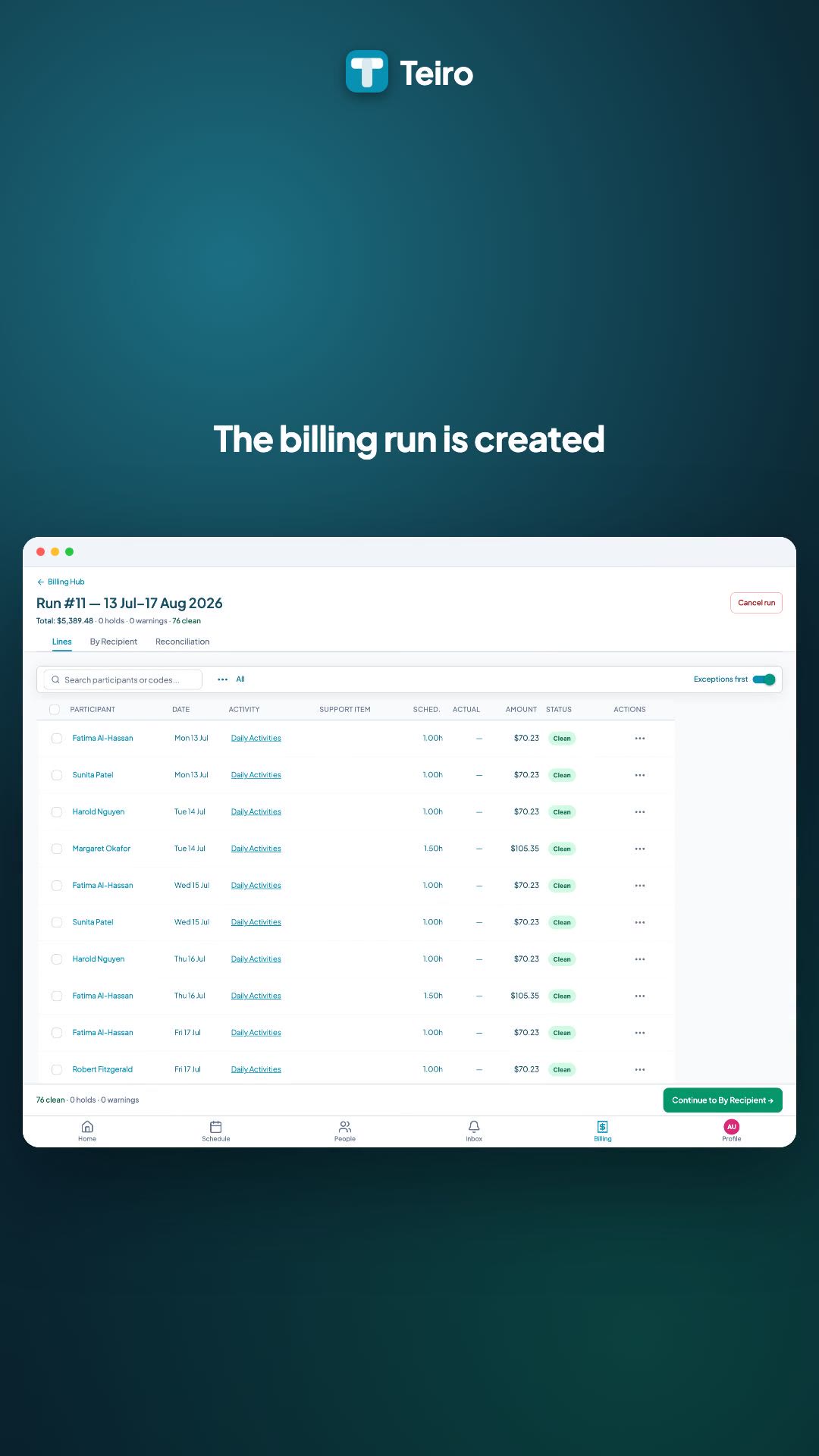
A billing officer picks up held and verified services, reviews every claim line, and groups them by how each plan is funded. From there the run drafts the NDIA claim file and reconciles payments coming back, all from the one screen.
 0:32
0:32Watch
Running a Billing Run and Reconciling Payments in Teiro
A short walkthrough of a real NDIS billing run in Teiro: picking up held and verified services, reviewing every claim line, grouping lines by how each plan is funded, drafting the NDIA claim file, and reconciling payments, all from one screen.
Watch the walkthrough
The Billing Hub: stat chips and run history at a glance
Held lines show the reason and resolution options. Clean lines are ready to send
How it works
Billing runs from completed shifts.
Select a participant or a date range and generate a billing run. Teiro pulls in every completed shift from that period, applies the applicable service agreement line, calculates the rate, and produces a set of claim lines ready for review. No data entry. No copying from the scheduling system into a separate billing tool. The shift record is the source.
Hold logic that protects you before submission.
Each claim line is evaluated before it leaves Teiro. Lines are held, not discarded, held, when: there is no recorded attendance (check-in or manual sign-off), there is no active service agreement for the participant, the service agreement has no line covering that support category, the assigned worker's NDIS Worker Screening has expired, the line appears to be a duplicate of one already submitted, or the shift was cancelled in a way that is not billable under the participant's agreement. The hold reason is shown on the line. You resolve it or exclude it: the decision is yours, and it is logged. A rate that exceeds the current NDIS price guide cap is not a hold. Teiro caps it to the maximum automatically at billing time and bills at the capped rate, flagging the line with a warning so you can see it happened and check it against the service agreement if needed.
Service agreements per participant.
Each participant has a service agreement in Teiro that defines which support categories are funded, the rates that apply, the management type, and the funding period. When a billing run is generated, the service agreement is what ties the shift to the correct claim line and rate. Coordinators can see agreement coverage gaps before they become billing problems.
Invoicing by management type.
NDIA-managed participants: the billing run produces a bulk payment request CSV formatted for the NDIA portal. Teiro does not submit directly to the NDIA — the CSV is uploaded manually by your billing officer. Plan-managed participants: Teiro generates an invoice addressed to the participant's plan manager. Self-managed participants: Teiro generates an invoice to the participant directly. If a self-managed participant has no email address on file, Teiro flags it proactively before the billing run is finalised.
Payment reconciliation.
Once the NDIA processes a payment request or a plan manager pays an invoice, import the remittance file into Teiro. The system matches payment references back to the original claim lines. Lines move from submitted to paid automatically where there is a match. Discrepancies — amounts that differ from what was claimed — are surfaced for review. The reconciliation dashboard shows paid, submitted, pending, and anomalous lines in one view.
What billing actually looks like at a 50-participant provider
A billing officer at a provider with 50 NDIS participants typically runs billing fortnightly. The process starts with a phone call or Slack message to the scheduler asking for a list of completed shifts. The scheduler exports a CSV from the rostering tool — if the provider has one — or copies rows from a spreadsheet. The billing officer opens a separate NDIS billing tool, or an Excel template, and starts keying in line items: participant number, support item reference, date, hours, rate. For a busy fortnight across 50 participants, this is several hours of data entry.
Errors come in two varieties. The first kind is caught before submission, if the officer has time to check: a shift that was logged as completed but the carer never actually checked in, a participant whose service agreement expired three weeks ago, a rate that was entered manually and is over the current NDIS price guide cap. The second kind is caught after submission, in the form of a rejection from the NDIA or a short payment from a plan manager — which triggers a rework cycle that can take another day.
In Teiro, the billing officer opens the billing module, selects the date range, and generates the run. The line items are already there, pulled from the shift records that have been completed and attended. Lines with issues are held with a reason — the officer reviews them, resolves what can be resolved, and excludes what cannot. For NDIA-managed participants, the approved lines export to the CSV format required for the NDIA portal. For plan-managed participants, invoices are ready to send to the plan manager. For self-managed participants, invoices go directly to the participant.
When the payment comes back, the officer imports the remittance file. Teiro matches the payment references back to the original lines. Paid lines are marked. Short payments and discrepancies are surfaced. The reconciliation is done in minutes rather than as a half-day exercise at the end of the month. For a provider growing from 50 to 150 participants, the difference between these two workflows is the difference between billing being manageable and billing being a reason to hire a second person for it. See how compliance checks integrate with the billing workflow to flag expired worker screening before claims are submitted.
What the billing module is — and what it is not
Teiro handles the claiming side of NDIS billing: generating lines from shifts, applying hold logic, routing invoices, and reconciling payments back to claims. It does not handle payroll, accounts payable, or general ledger accounting. Your existing accounting system — Xero, MYOB, or otherwise — still handles those things. Teiro does not replace them.
For NDIA-managed participants, Teiro exports a bulk payment request CSV that you upload manually to the NDIA myplace provider portal. Teiro does not connect directly to PRODA or submit claims automatically. The manual upload step remains in place; what Teiro removes is the data entry that precedes it.
This boundary matters because providers are often sold billing tools that promise more integration than they deliver, or that create new reconciliation problems at the accounting boundary. Teiro is clear about where it starts and stops. The billing module is purpose-built for the claim generation and reconciliation workflow that sits between the shift record and the payment — not for everything downstream of it. Teiro is free for organisations with five or fewer active users.
Frequently asked questions
Does Teiro submit claims to the NDIA automatically?
No. For NDIA-managed participants, Teiro generates a bulk payment request CSV that is formatted for the NDIA myplace provider portal. Your billing officer uploads that file to the portal manually. Teiro does not connect directly to PRODA. The manual submission step is retained; what Teiro eliminates is the data entry and error-checking work that comes before it.
What is a “held” claim line?
A held line is a claim line that has been generated from a shift but flagged for review before it can be approved and included in a submission. Holds are applied automatically when the system detects a problem: no attendance evidence, no active service agreement, an expired worker credential, a possible duplicate, or a cancellation that is not billable under the participant’s agreement. The hold reason is shown on the line. You can resolve the issue and release the hold, or exclude the line from the run with a note. Nothing is submitted without your approval. A rate that exceeds the NDIS price guide cap is not a hold: Teiro caps it to the maximum automatically and bills at that rate, flagging the line with a warning so you can see it happened.
Does it handle plan-managed and self-managed participants?
Yes. Teiro routes billing output based on each participant’s management type. NDIA-managed participants produce a bulk payment CSV. Plan-managed participants produce an invoice addressed to their plan manager. Self-managed participants produce an invoice addressed to them directly. If a self-managed participant has no email on file, Teiro flags it before the billing run is finalised so you can add the contact before sending.
Do I still need accounting software?
Yes. Teiro handles the NDIS claiming workflow — generating lines from shifts, holding and approving claims, invoicing, and reconciling payments back to claims. It does not replace your accounting system. Payroll, accounts payable, GST, and general ledger accounting remain in Xero, MYOB, or whichever system your organisation uses. The billing module is designed to sit cleanly alongside your accounting setup, not to replace it.
What happens when the NDIA payment does not match what was claimed?
When you import the remittance or payment file, Teiro matches payments back to claim lines by reference. Lines where the paid amount matches the claimed amount are marked as paid automatically. Lines where the amounts differ are surfaced in the reconciliation dashboard as anomalies for review. You can investigate and recode as needed. The full recode history is retained in the audit trail.
Is billing included in the free plan?
Yes. The billing module is part of the full Teiro platform. Organisations with five or fewer active users have access to it at no charge — no trial period, no credit card required. The same features available to paid plans are available on the free plan; the only limit is the number of active users.
Related guides and tools
Running a Billing Run and Reconciling Payments (Video Walkthrough)
See a real billing run end to end: held and completed services, the claim file, and reconciliation.
NDIS Billing Software: A Practical Guide
How claiming, hold logic, and reconciliation fit together for Australian providers.
Compliance and qualification tracking
Expired worker screening is one of the reasons a claim line gets held before submission.
Rostering and scheduling
Completed shifts are the source for every claim-ready billing line.
NDIS Bulk Upload CSV Builder
Build and validate the bulk payment request CSV for NDIA-managed claims.
NDIS Invoice Template (Self-Managed)
Generate a compliant invoice for self-managed participants.
SCHADS Award Pay Rates 2026-27
Base rates, casual loading, and penalty rates for care and home care workers.
NDIS Support Catalogue 2026-27
Browse support item codes and current national price limits before you claim.
See the billing module live
We’ll walk through a billing run, hold logic, and reconciliation in your demo — with real data from your organisation type.
Free for under 5 users - no credit card, no time limit.