
What NDIS billing actually involves
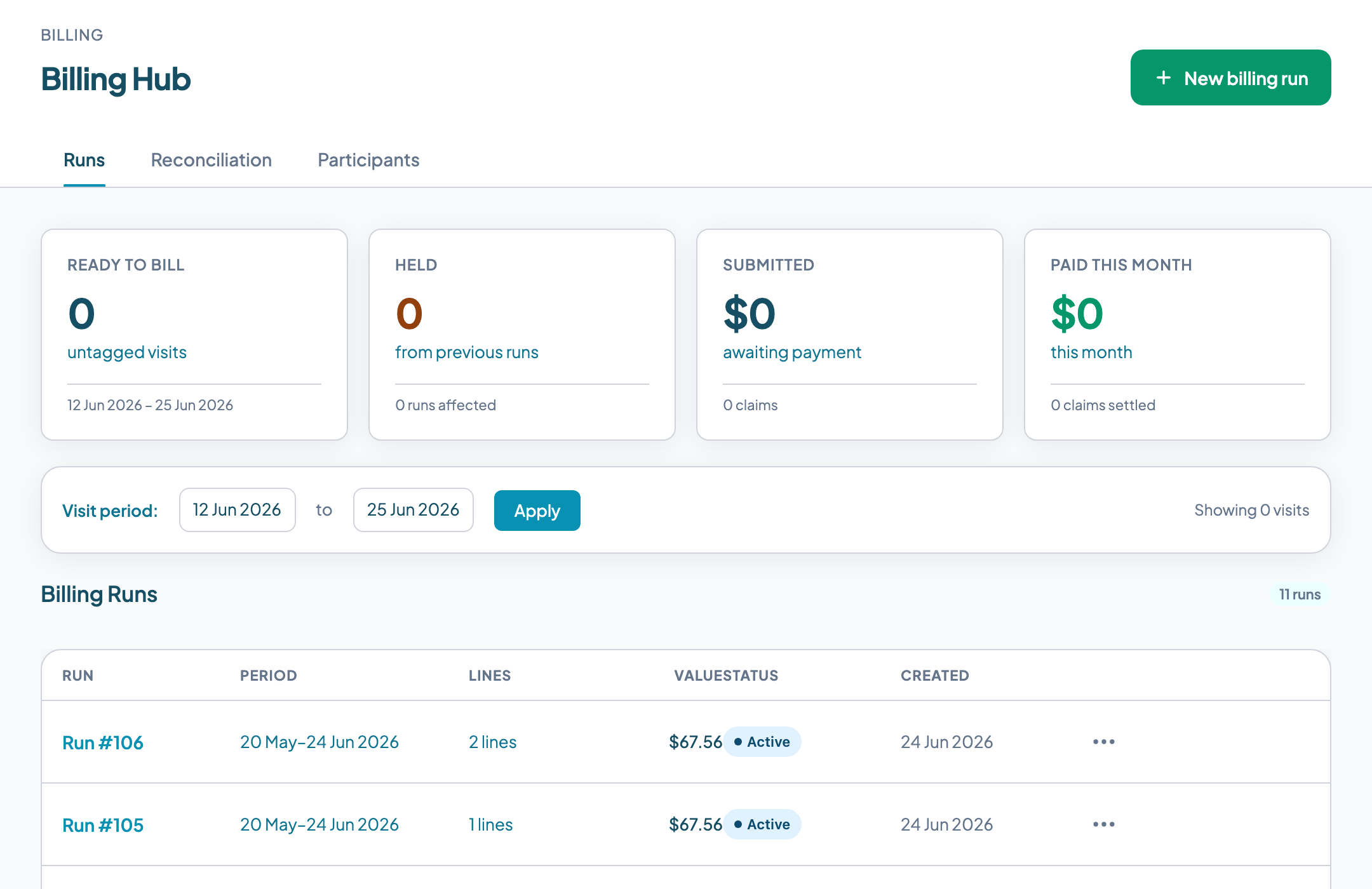
The billing lifecycle for an NDIS provider follows a fixed sequence. A shift is delivered and the worker checks out. Attendance evidence is captured. The coordinator or billing officer verifies the shift. A billing run is created, grouping verified shifts by participant and funding type. Claim lines are reviewed and any holds are resolved. For agency managed participants, a bulk payment request (BPR) CSV is exported and uploaded manually to the NDIA myplace portal. For plan-managed participants, an invoice is sent to the plan manager. For self-managed participants, an invoice is sent directly to the participant. Payment arrives. The remittance is imported and reconciled against open claims.
Each of these three management types works differently, and most providers support all three simultaneously.
Agency managed
The NDIA holds and manages the participant's funds. The provider submits a bulk payment request CSV to the NDIA myplace portal. Payment for a validated request generally reaches the provider's nominated account within a few business days, though this is not a guaranteed timeframe and requests selected for review take longer. Rate caps are enforced by NDIA at their end.
Plan-managed
A registered plan manager holds the participant's funds. The provider invoices the plan manager, not NDIA. Payment comes from a private entity and turnaround times vary by plan manager. The provider must track outstanding invoices themselves.
Self-managed
The participant manages their own funds. The provider invoices the participant directly. The participant claims the funds from NDIA themselves and pays you directly. The provider must have a valid email address for the participant to send the invoice.
Many participants have mixed management: some supports are agency managed, others are plan-managed. A billing system that cannot track management type at the service agreement line level will route claims incorrectly.
The service agreement as the source of truth
Every NDIS claim traces back to an active, correctly configured service agreement. The service agreement is the contract between the provider and the participant: it specifies which supports will be delivered, at what rates, and what the funding cap is for each support category.
Most billing failures originate here, not in the billing system itself. The upstream errors that most often cause payment failures are:
- →The service agreement is expired. Services delivered after the agreement end date are not covered, regardless of whether the work was done.
- →The service agreement exists but does not include a line item for the support category delivered. A participant might have a core supports agreement that does not cover capacity building. If a capacity building shift is delivered and billed, it will be rejected.
- →The agreed rate on the SA exceeds the current NDIS pricing schedule cap. NDIA will pay the pricing schedule cap, not the agreed rate. The provider absorbs the difference.
- →The SA covers the correct support category but has exhausted its budget. Claims can still be created and submitted -- but NDIA will not pay once the funding bucket is empty. Note: budget tracking and near-limit warnings in Teiro currently apply to agency managed lines. For plan-managed and self-managed participants, budget visibility is managed through the plan manager or participant directly.
A billing system that checks SA validity before a claim line is created catches these problems at the right moment: before you have already done the work, invoiced the client, and submitted to NDIA.
Pre-submission hold logic: what good billing software catches before you submit
Most billing software documentation describes what you can claim. Very few describe what should be blocked before you submit. Pre-submission holds are the mechanism that prevents bad claims from reaching NDIA, plan managers, or participants -- where they become rejection notices, compliance findings, or audit flags.
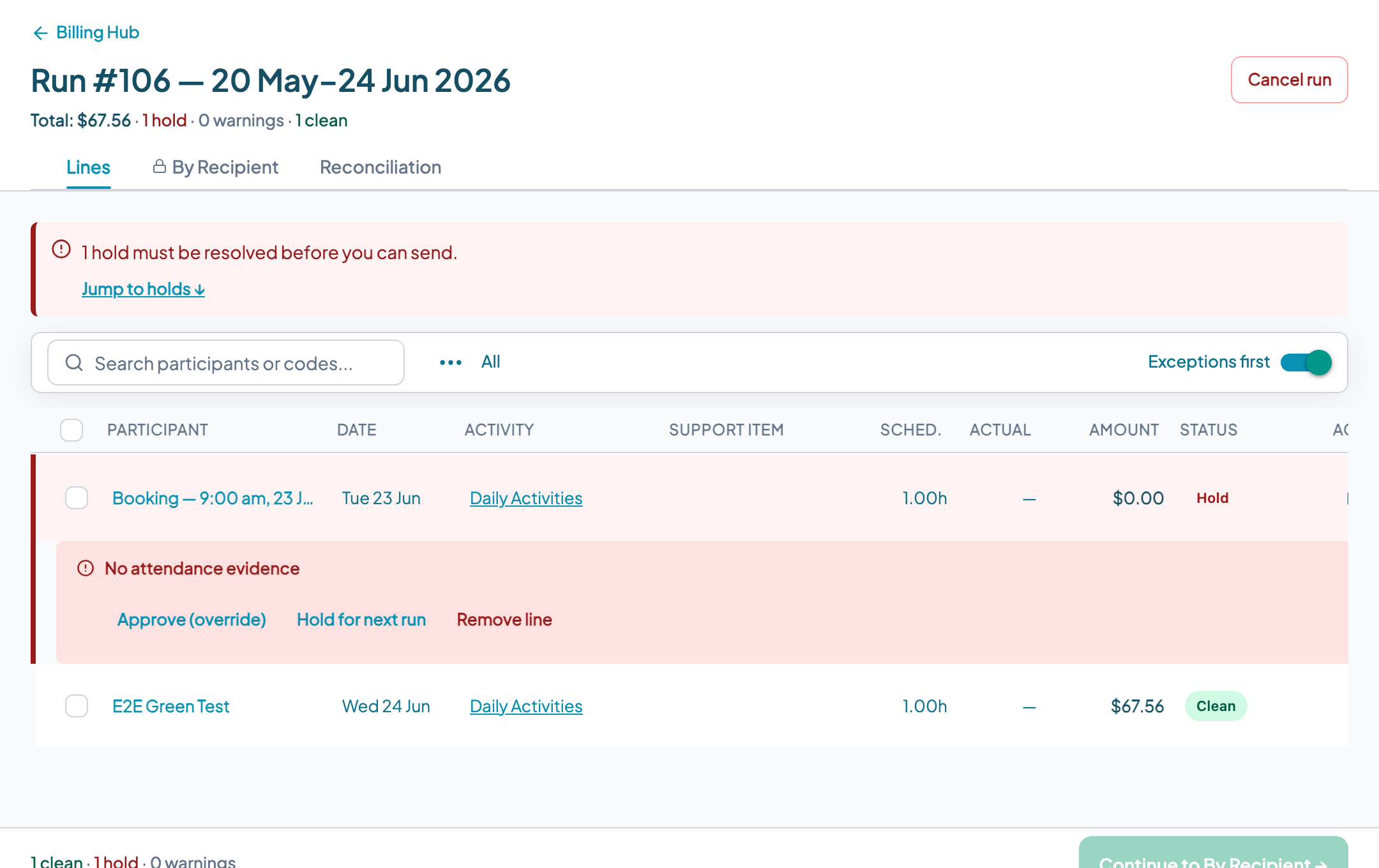
In Teiro, claim lines are automatically held before submission when any of the following conditions are detected:
No active service agreement
The participant has no current SA. The claim line cannot be attributed to any agreement.
No SA line covering the activity type
An SA exists but does not include a line item for the support category of this shift.
No attendance evidence
The shift was marked delivered but no check-in or check-out was recorded. Attendance verification is required before billing.
Expired worker screening at time of service
The worker's NDIS Worker Screening Check had lapsed on the date the shift was delivered. Workers in risk-assessed roles must hold a current NDIS Worker Screening clearance -- delivering a risk-assessed shift without one is a compliance breach.
Possible duplicate
A claim line for the same participant, support item, and service date already exists in a prior billing run.
Cancellation not billable
The shift was cancelled under conditions that do not meet the NDIS short-notice cancellation rules.
Holds are not failures. They are the system doing its job. A billing officer reviews held lines, resolves the underlying issue, and releases the line for submission. Lines that cannot be resolved are removed from the run. This is the correct workflow.
SCHADS rates and the NDIS Pricing Arrangements: how they interact
The SCHADS Award and the NDIS pricing schedule (formerly the Pricing Arrangements and Price Limits) operate on the same shift but serve different purposes. Understanding how they interact is essential for providers managing margins.
SCHADS sets the minimum you must pay workers. The Award specifies ordinary time rates, penalty rates for evenings, weekends, and public holidays, broken shift allowances, and travel time. These are legal minimums -- you cannot pay less.
The NDIS pricing schedule sets the maximum you can claim from NDIA for a given support item. Price limits are set by support item code and shift type. NDIA will not pay above these limits regardless of what is on the service agreement.
The spread between the two figures is the provider's margin. When SCHADS rates increase (which they do annually, usually from 1 July) and the Pricing Arrangements do not increase by the same amount, margin compresses. When a Pricing Arrangements update lags a SCHADS increase, some support items run at negative margin for part of the year.
Practical implication for billing software
The agreed rate on a service agreement should always be checked against the current Pricing Arrangements cap before submission. If your SA was set up twelve months ago and a Pricing Arrangements update has since reduced the cap below your agreed rate, you will receive less than your SA says you should. A billing system that flags this at the claim line level -- before submission -- lets you renegotiate the SA or absorb the difference knowingly rather than discovering it on the remittance advice.
Submitting to NDIA: bulk payment requests
For agency managed participants, providers submit claims through a bulk payment request (BPR) file. The BPR is a CSV file with a specific format required by NDIA. It contains one row per claim line, with the following fields: provider ABN, participant NDIS number, support item code from the NDIS support catalogue, service start and end dates, quantity (hours or units), unit price, total amount, and a provider claim reference that is unique to each line.
In Teiro, the BPR file is generated automatically from a completed billing run. Once the billing officer has reviewed the run, resolved holds, and approved the claim lines, the export button produces a correctly formatted CSV.
How submission works: manual portal upload
Teiro exports the BPR CSV. The billing officer then uploads this file manually to the NDIA myplace provider portal. Teiro does not integrate directly with PRODA or submit to NDIA on your behalf. This is worth being clear about: direct PRODA integration is not available in Teiro at this time. The portal upload step remains with your team.
The provider claim reference in each row is critical. It is the identifier that links the NDIA payment response back to the original claim line when you reconcile. A BPR where claim references are not unique, or where they change between submission and reconciliation, breaks automated matching.
Payment reconciliation
After NDIA processes a BPR, they return a myplace upload results CSV. This file contains one row per claim line showing the amount requested, the amount approved, and a response code. The provider claim reference from the original BPR is included, which is how each row is matched to the original claim.
Partial payments are common. NDIA applies its own rate cap at processing, so if your submitted rate was above the current Pricing Arrangements cap, NDIA pays the cap and the difference is written off. If a participant's funding bucket is exhausted, that line receives zero payment. Response codes indicate the reason for any reduction.
In Teiro, the myplace upload results CSV is imported into the billing module. Lines with matching provider claim references are automatically reconciled. Lines where the paid amount differs from the submitted amount are flagged for review. Lines with no match -- where the claim reference in the results file does not correspond to any submitted line -- are surfaced for manual investigation.
Manual reconciliation -- printing the results file, pulling up the original BPR in a spreadsheet, and matching by reference number line by line -- is one of the most time-consuming billing tasks at mid-to-large providers. For an organisation with 50 active agency managed participants, this process runs to three to five hours per payment cycle without software support.
Billing for different provider types
The three funding management types create three parallel billing workflows. Providers who support all three -- which is most registered providers of meaningful size -- need a system that can run all three from the same billing run without manually separating lines.
Agency managed participants are the simplest operationally: NDIA pays quickly and consistently. The main errors are SA configuration problems and rate cap mismatches. The BPR export must match NDIA's current file format and use current support item codes -- codes that were valid last year may have been retired.
Plan-managed participants introduce a private entity (the plan manager) into the payment chain. Different plan managers have different invoice requirements: some require the NDIS support item code on the invoice; most require the participant's NDIS number; some have their own reference numbers they want included. Payment terms vary by plan manager and can be 14 to 45 days. When a participant changes plan managers mid-plan -- which happens -- invoices must be directed to the new plan manager from the changeover date, not the old one.
Self-managed participants have the longest and least predictable payment cycle. The participant claims the funds from NDIA themselves and pays you directly. The provider has no visibility into when the participant has lodged their claim with NDIA. A common failure: the participant has no valid email address in the system, the invoice is never sent, and the debt ages silently.
Mixed-management participants require the billing system to correctly separate claim lines by funding type within the same billing run. A participant whose core supports are agency managed but whose capacity building is plan-managed should have two separate billing outputs. Getting this wrong does not always produce an error -- it may produce a clean submission to the wrong entity, which is worse.
What to look for in NDIS billing software
When evaluating billing tools for an NDIS provider, the questions that matter are not about the feature list. They are about whether the system handles the scenarios where billing goes wrong. Specific things to verify:
- QDoes the system support all three funding management types -- agency managed, plan-managed, and self-managed -- from a single billing run, or does it require separate workflows for each?
- QDoes it run pre-submission hold checks before a claim line reaches the export stage, and does it name the specific hold reason, or just flag a generic error?
- QIs billing connected to the roster? Can a shift move directly from verified to billable without re-keying dates, hours, and support items into a separate system?
- QDoes the BPR export match the current NDIA myplace portal format? Has the vendor updated it after the last NDIA support catalogue version change?
- QDoes it import the myplace upload results CSV and auto-match by provider claim reference, or is reconciliation manual?
- QDoes it flag self-managed participants with no email address before a billing run is created, not after an invoice fails to send?
- QDoes it alert on SA coverage gaps -- participant has shifts scheduled for a support type not covered by their current SA?
What a vendor should demonstrate
Ask the vendor to walk you through what happens when a shift is delivered for a support type not covered by the participant's current service agreement. If the system does not surface a hold at the billing run stage -- before the claim is sent anywhere -- you will discover this error in a rejection notice or an audit, not in a pre-submission review. Teiro is free for organisations with 5 or fewer active users -- sign up to test these scenarios against your own data before committing.
The best NDIS billing software in 2026: how the options compare
"Best" depends on which part of billing is actually hurting. A provider drowning in plan-managed invoice formatting has a different problem to one that keeps getting BPR batches rejected. The comparison below is scoped to billing and claiming capability specifically -- for a full platform comparison covering rostering, compliance, and the mobile app as well, see the full platform comparison.
| Platform | Funding types in one run | NDIA submission | Pricing |
|---|---|---|---|
| Teiro | Agency, plan-managed, self-managed -- one billing run, pre-submission holds on all three | BPR CSV export, manual myplace upload (no direct PRODA/PACE submission) | Free for 5 or fewer active users, full platform. Per-user pricing above that. |
| ShiftCare | NDIS invoicing and PACE integration is a stated strength | PACE integration | $8-$25/user/month across four tiers; SMS billed separately at $0.10/message; client portal access costs extra per client |
| Lumary | Plan management, service bookings, invoicing on a Salesforce base | Salesforce-configured billing workflow | Enterprise, quote-only; implementation typically takes months |
| FlowLogic | Deep plan management and billing focus | Supports PRODA and PACE integration | Quote-only |
| CareMaster | Billing alongside rostering, compliance, and HR | Not specified publicly | From $16/user/month (Essential plan, excl. GST, 5-user minimum), 30-day free trial |
| Imploy | Bulk invoicing with native Xero sync | Not specified publicly as PACE/PRODA-integrated | Free starter tier available |
Pricing and integration details for ShiftCare, Lumary, FlowLogic, CareMaster, and Imploy are drawn from each vendor's own published marketing and pricing pages. Prices move -- confirm current figures directly with the vendor before deciding.
Two honest gaps in Teiro worth naming directly, because a vendor who won't name their own gaps is one you should double-check on everything else they tell you:
- →No direct PRODA or PACE submission. Teiro generates a correctly formatted BPR CSV from a completed billing run; your billing officer still uploads it to the myplace portal by hand. FlowLogic and ShiftCare both advertise direct PACE integration -- if eliminating that manual upload step entirely is your priority, weigh that against the rest of what each platform costs you elsewhere.
- →No accounting software integration. Teiro does not sync billing data to Xero or MYOB. Imploy's bulk invoicing does sync to Xero -- if closing the loop between NDIS claims and your general ledger without manual export is the deciding factor, that's a real point in its favour.
What Teiro does instead of chasing either of those: billing that reads directly off verified shifts rather than a separate re-keyed export, and pre-submission holds specific enough to name the exact problem (missing SA line, expired worker screening on the service date, unresolved cancellation) before anything leaves your building. See how Teiro's billing runs work.
What is the best NDIS billing software?
There isn't a single best answer -- it depends on which billing problem you actually have. Providers who need direct PACE submission with no manual portal step should look at ShiftCare or FlowLogic. Providers who need billing tied to Xero should look at Imploy. Providers whose main pain is billing disconnected from an accurate roster -- claims built from a separate spreadsheet rather than verified shifts, with no pre-submission checks -- are the ones Teiro is built for: one billing run across agency, plan-managed, and self-managed participants, with holds that name the exact problem before a claim reaches NDIA. Book a demo and bring your own service agreements to test it against.
What's the difference between NDIS invoicing software and NDIS claiming software?
"Invoicing" usually refers to plan-managed and self-managed participants, where you bill a plan manager or the participant directly rather than submitting to NDIA. "Claiming" usually refers to agency managed participants, where you submit a bulk payment request to the NDIA myplace portal and NDIA pays you. Most registered providers need both -- see how plan-managed billing differs from agency managed for the invoicing side, and why bulk payment requests get rejected for the claiming side.
Why is my NDIS claim held before submission?
A held claim line means the billing system has detected a condition that prevents safe submission. The most common causes: no active service agreement for the participant as of the service date, no SA line item covering the support category delivered, or no attendance evidence recorded for the shift. In Teiro, each held line names the specific cause so a billing officer can resolve it before anything is sent to NDIA. See the full breakdown in Why NDIS claims get held before submission.
What is a bulk payment request (BPR)?
A bulk payment request is the CSV file that registered NDIS providers submit to the NDIA myplace portal to claim payment for agency managed participants. Each row represents one claim line: participant NDIS number, support item code, service start and end dates, quantity, unit price, and a unique provider claim reference. NDIA processes the file and returns a results CSV showing approved amounts and any line-level rejections. The provider claim reference is how each payment is matched back to the original submitted line during reconciliation. Payment for a validated request generally reaches the provider's nominated account within a few business days, though this is not a guaranteed timeframe and requests selected for review take longer. Teiro generates the BPR CSV automatically from a completed billing run; the billing officer uploads it manually to the myplace portal.