
Client Records
One client record. Progress notes that surface themselves.
Every client has a single record in Teiro: details, contacts, documents, service agreements, and a progress notes feed, all in one place. Support workers write progress notes from the shift, and the previous visit's note is already sitting above the feed before they write their own.
No separate case management module bolted on the side. The client record, the visit record, and the notes on both are built on the same underlying record type as everything else in Teiro.
Running a small team? Free for under 5 users - no credit card, no time limit.
Watch: writing a progress note after a visit
A support worker finishes a visit and writes the progress note against the client record, with the previous note already in front of them.
 0:28
0:28Watch
Writing a Progress Note After a Visit
How a support worker writes an NDIS or aged care progress note in Teiro straight from the visit record: seeing the client's note history, a full-screen composer, and a save that timestamps and attributes the note automatically.
Watch the walkthrough
Progress notes, not case notes
Australian disability and aged care providers write progress notes, not the case notes vocabulary that belongs to community services. Teiro's notes feed uses the term your team already uses, on the client record and on every visit.
The last note is right there, not three taps away
Open a visit and the most recent note from the previous visit sits collapsed at the top of the feed, ready to expand. A support worker starting a shift does not have to scroll back through history or ask a coordinator what happened last time.
One record type, not a bolt-on notes module
Client records, visits, and progress notes are all the same underlying record type in Teiro. There is no separate "notes system" that falls out of sync with the client record it is supposed to describe.
Nothing saves without a name and a time
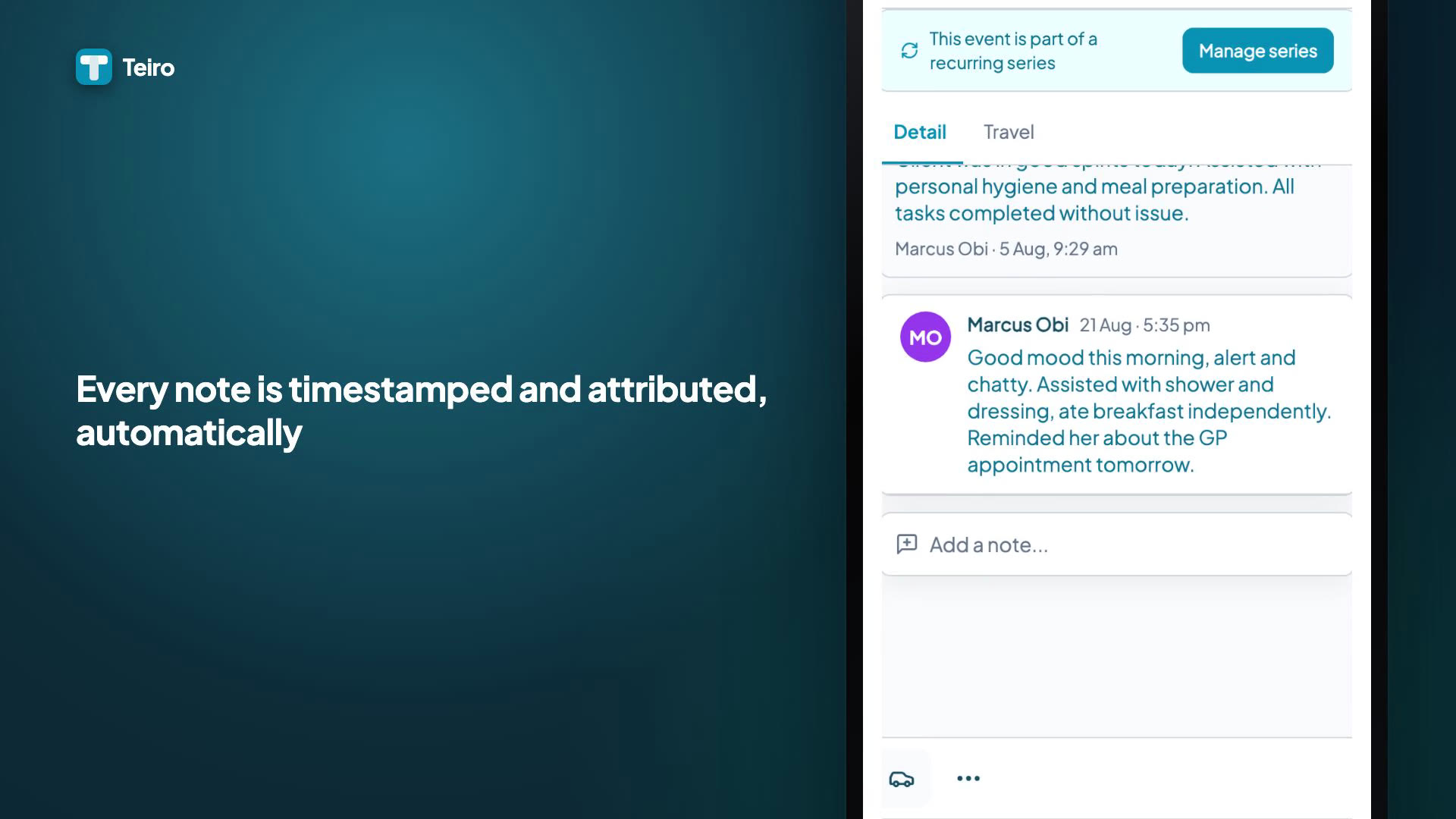
Every note is attributed to the person who wrote it and stamped with when. Coordinators reviewing a client's history see who said what, not an anonymous log entry.
How it works
The client record is the hub
Every client has a record with their details, contacts, care plan information, and a documents library. Service agreements, incidents, and every visit for that client all connect back to this one record, so a coordinator opening a client's file sees the whole picture rather than piecing it together from separate systems.
Progress notes live on the client and on the visit
Notes can be added directly to the client record for general updates, and on each individual visit for what happened during that specific service. Both use the same notes feed component: a loading state while it fetches, a clear empty state on a brand-new record, and the full list oldest to newest once there is history.
Writing a note is a proper composer, not a cramped text box
Tapping "Add a note…" opens a dedicated full-height composer with the keyboard docked underneath it, so what you are typing is never hidden behind the keyboard on a phone. Quick-entry actions live in the composer's toolbar for the common, low-friction updates.
The previous visit's note surfaces itself
On a visit, the most recent note from the client's last service appears as a collapsed card above the current notes feed, tap to expand. A support worker walking into a shift sees what mattered last time without a separate handover conversation or a phone call to the office.
Every note is signed, in effect, by attribution
Each entry in the feed carries the author's name and the date and time it was written. There is no unattributed free-text log. If a note needs to be understood in context weeks later, who wrote it and when is not a mystery.
Frequently asked questions
Does Teiro use progress notes or case notes?
Progress notes. "Case notes" is community services terminology; Australian disability support and aged care providers write progress notes, and that is the language Teiro's notes feed uses throughout, on the client record and on every visit.
Can a support worker see the previous visit's note before starting a shift?
Yes. When a support worker opens a visit, the most recent note from the client's previous service appears as a collapsed card above the current notes feed. Tapping it expands the full note. There is no need to scroll back through history or call the office for a handover.
Are progress notes attached to the client or to the individual visit?
Both. A client record has its own notes feed for general updates, and each visit has its own notes feed for what happened during that specific service. Both use the same underlying notes component, so the experience of reading and writing a note is identical wherever it appears.
Can progress notes be edited or deleted after they are saved?
Notes are attributed to the author and time-stamped at the point they are saved, in the same spirit as a paper progress note: a permanent, dated entry rather than a document you continually rewrite. Speak with your Teiro contact about your organisation's specific policy on corrections and amendments.
Related guides and features
How to generate a client progress summary
Turning a run of progress notes into a summary a coordinator or family member can actually read.
How to write a shift note that stands up in an audit
What a progress note needs to include to hold up if it is ever reviewed.
NDIS progress note template
A ready-to-use template for the structure a progress note should follow.
NDIS client management software: what to look for in 2026
What actually matters when comparing client-record systems for an NDIS provider.
Service agreements, consents, and documents
The funding and consent record that sits alongside every client record.
Compliance and qualification tracking
The credential register that sits alongside client records in the same platform.
See client records and progress notes live
We'll walk through a real client record, the notes feed, and how the previous visit's note shows up automatically at the start of the next one.
Free for under 5 users - no credit card, no time limit.