
Recording a Medication Administration in Teiro
How a support worker records a dose in Teiro: the daily view, single and batch administration, the outcome options, and how controlled drug entries differ.
Overview
This guide covers how a support worker actually records a medication administration during a visit: where to find what is due, how to record a single dose or a batch, what the outcome options mean, and why a controlled drug entry asks for more than a tap.
Watch the walkthrough
 0:36
0:36Watch
A Medication Administration Record Walkthrough in Teiro
A short walkthrough of a medication administration record in Teiro: today's doses grouped by time of day, the client's active medication list, a whole time slot recorded in one batch with a separate signature per medication, and a PRN dose recorded with its trigger and effect.
Watch the walkthrough
Finding what is due
Open the client's Medications tab from the visit screen. The daily view groups everything due today by time slot, morning through overnight, the same grouping a support worker would expect from a paper MAR.
Recording a single dose
Tap the medication to open it, choose the outcome, and confirm with a signature. The available outcomes are:
- Given
- Refused
- Withheld
- Self-administered
- Not supplied
- Missed
Any outcome other than given should include a reason. This is what turns "refused" from a bare fact into something a coordinator or clinical lead can actually act on.
Recording a batch
Where several medications are due at the same time slot and were given together, they can be confirmed in a single batch action rather than opened one at a time. A batch confirms up to 50 items at once, and it is atomic: either the whole batch is recorded or none of it is, so a batch action cannot leave the record in a half-recorded state.
Recording a Webster pack pocket
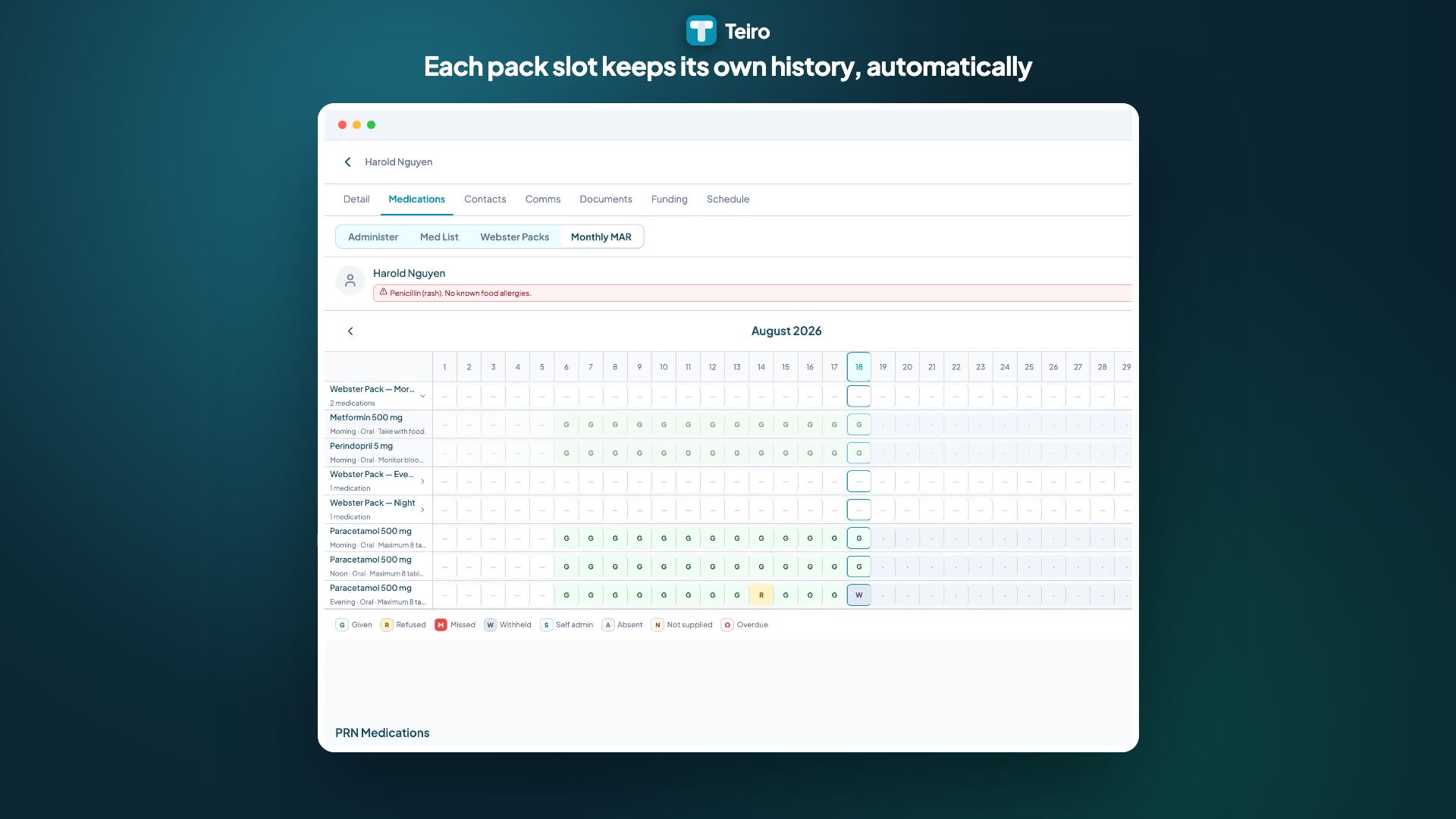
If the client's medications are packed into a Webster pack, they appear on the daily view grouped by the same time slot as any other medication. Work through everything due in the pocket in the one batch action described above and sign each medication individually; the pack changes how the medications are grouped on screen, not whether each one gets its own signature. If one medication in the pocket needs a different outcome than the rest, for example a withheld dose while the rest of the pack is given as normal, record it separately. See Webster packs in Teiro for how packs are set up.
PRN medications
A PRN medication is administered from the same screen, but the entry asks for what triggered the dose and what effect it had. The number of doses already given that day is shown against the medication, so a support worker can see the day's history before giving another one.
Controlled drugs (S4, S4D, S8)
An S8 entry, and other controlled drug entries, cannot be confirmed with a saved one-tap signature. Teiro requires a fresh biometric confirmation each time, falling back to an in-app PIN on web or where biometrics are unavailable. A witness can also be recorded, present in person, by phone, or noted as not required under the client's care plan, but the witness field is optional metadata captured by the same carer. It is never a condition for saving the entry; the signature is what is required, on every entry, controlled or not.
Can I fix a mistake?
A dose can be recorded for today or, at the latest, the day before. It cannot be recorded ahead of time, and it cannot be backdated further than that. Once recorded, an entry cannot be recorded again for the same medication and time slot, which stops the same dose being logged twice. If you notice an entry was recorded incorrectly outside that window, contact your coordinator.
Frequently asked questions
What if a medication is not on the list for today? Check with your coordinator. A missing scheduled medication usually means it has not been set up correctly, or it has been marked inactive.
Does a refused dose need anything beyond selecting "Refused"? Always include a reason. A refusal without context does not tell your coordinator or clinical lead what, if anything, needs to happen next.
Why does an S8 entry ask me to use my fingerprint or face again, when I already signed in? This is deliberate. A saved signature behind a single tap is a weaker record for a controlled drug than a fresh confirmation each time, because it cannot show that the specific person administering that specific dose was the one confirming it. Signing in to the app and confirming an S8 entry are two different checks.
Next steps
- Setting Up a Client's Medications in Teiro: add and configure medications before they can be administered
- The Monthly MAR and CSV Export in Teiro: the full month, from a coordinator's view
Ready to see this running with your own client data? Book a demo or sign up free for organisations with 5 or fewer active users.
Related articles
Setting Up a Client's Medications in Teiro
How to add a medication to a client record in Teiro: scheduled times, PRN details, schedule classification, and flagging a medication as pharmacy-packed into a Webster pack.
Webster Packs in Teiro
How dose administration aids work in Teiro: the pharmacy record Teiro keeps for a client's pack, flagging which medications come packed, and how each one is still signed individually.
The Monthly MAR and CSV Export in Teiro
How to read the monthly medication administration record grid in Teiro, and how to export a month of entries to CSV for review or audit.
Submitting incident reports
Report incidents, near misses, or safeguarding concerns directly from the app.