
Incidents
Report it from the shift. Review it before anyone has to ask.
A support worker files an incident from the shift or the client record with a handful of required fields. A coordinator reviews it, confirms whether it is reportable to the NDIS Commission or the Aged Care Quality and Safety Commission, records notifications, and closes it with an outcome.
Severity and reportability are kept as two separate questions on purpose, because low harm does not always mean no obligation to report.
Running a small team? Free for under 5 users - no credit card, no time limit.
Watch: filing a reportable incident from a visit
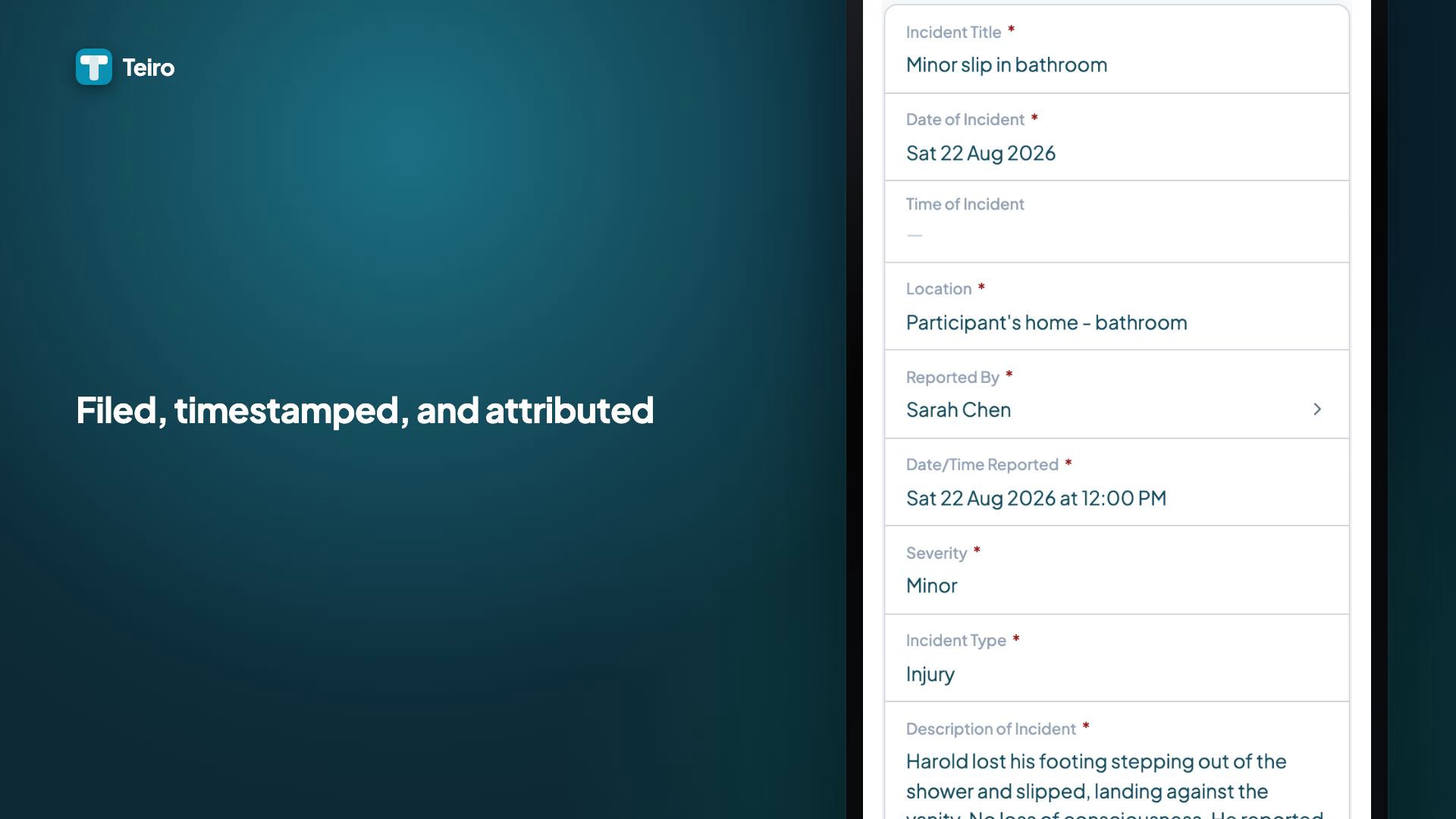
A support worker raises an incident from the visit it happened on, and it lands in the register with the visit and client already attached.
 0:28
0:28Watch
Filing a Reportable Incident From a Visit
How a support worker files a reportable incident in Teiro straight from the visit it happened on: the client and shift already linked, a short form to classify and describe what happened, and a save that timestamps and attributes the report instantly.
Watch the walkthrough
Three doors, one record
Report Incident sits on the shift and on the client record, and there is a standalone "+" on the Incident Reports list. Whichever door is used, it is the same record, just with different fields pre-filled.
Enough fields to file it, more to review it
A support worker only needs incident type, severity, a description, and immediate action taken to save a usable record. The reviewer adds reportability, notifications, corrective actions, and the outcome later.
Severity and reportable are kept as two separate questions
Severity describes harm to the person. Reportable is a regulatory classification, decided by a coordinator, not inferred from the severity dropdown. A low-harm incident can still be always-reportable, and the record is built so that distinction can't be silently skipped.
Closing is gated, not optional
An incident cannot move to Closed without an outcome recorded, and if it is marked reportable to the NDIS Commission, a notification reference is required first. The workflow will not let a reportable incident quietly disappear.
How it works
File it from wherever the incident happened
The Report Incident button lives on the shift, pre-filling the client and linking the service, and on the client record, pre-filling the participant. A standalone entry point on the Incident Reports list covers anything not tied to a specific shift or client.
Capture the facts while they're fresh
Incident type (fall, medication error, near miss, injury, behaviour of concern, restrictive practice, absconding, and more), severity (no harm, minor, serious, critical), a short description, and immediate action taken are the required fields. Injury detail, witnesses, third parties, and a notifications-made checklist (family, GP, coordinator, police, ambulance) are captured alongside.
It lands Open, in the coordinator's queue
Saving creates the incident in the Open state. The person who filed it keeps visibility of their own report; coordinators and admins see the whole queue, not just what happens to be forwarded to them.
A reviewer confirms reportability, separately from severity
Moving an incident to Under Review makes the reportability toggles visible, one for the NDIS Commission and one for the Aged Care Quality and Safety Commission (ACQSC), tracked separately because a provider serving both cohorts is under both schemes at once. A coordinator decides reportability; it is never inferred from severity alone.
Notifications and corrective actions get their own fields
Once notified, the notification reference and the date/time notified are recorded on the record. Corrective actions and an outcome (no further action, staff training, process change, or referral) are added before the incident can close.
Closing requires the record to actually be finished
The workflow blocks a transition to Closed until an outcome is set, and blocks it further, requiring a notification reference, if the incident is marked reportable to the NDIS Commission. Every state change is written to a full audit trail.
What Teiro does not decide for you
An incident is a real-world event before it is a record. Make the person safe, give first aid and call 000 if needed, and phone your on-call coordinator, before opening the app. Logging it in Teiro is the last step, not the escalation.
Reportability is a human decision, confirmed by a coordinator, and the exact notification deadline depends on the scheme and category, not a single flat rule. Teiro shows a Notification Due indicator, but it is not currently aware of every scheme's specific timeframe (such as the NDIS Commission's 5-business-day window for restrictive practices, or SIRS Priority 2's 30 calendar days). Confirm the real deadline against current NDIS Commission or ACQSC guidance and your organisation's policy, and use the free tools at the SIRS guide for aged care reporting timeframes.
Teiro also does not treat a complaint as an incident. A complaint about a late carer or a missed call is dissatisfaction with service, not a harm event, and filing it here to make it fit somewhere is the conflation auditors flag. It belongs in the complaints and feedback register, which is a separate record type with its own workflow, acknowledgement clock, and register report.
Frequently asked questions
Can a support worker report an incident from their phone during a shift?
Yes. A Report Incident button sits in the shift footer and on the client record, pre-filling the participant (and, from a shift, the linked service). Only incident type, severity, a description, and immediate action taken are required to save it; a coordinator adds the review detail afterwards.
Does severity decide whether an incident is reportable to the NDIS Commission?
No, and this is deliberate. Severity describes harm to the person; reportability is a separate regulatory classification confirmed by a coordinator. A low-harm incident, such as an unauthorised restrictive practice with no injury, can still be always-reportable, so the two are kept as distinct fields rather than one deciding the other.
Does Teiro calculate the correct SIRS or NDIS reporting deadline for me?
Not precisely, and we would rather say so than oversell it. The record shows a Notification Due indicator, but it is not scheme-aware across every category (it does not, for example, distinguish the NDIS Commission's 5-business-day window for restrictive practices from SIRS Priority 2's 30 calendar days). For an accurate aged care deadline, use the free SIRS deadline calculator and guide at teiro.com.au/sirs/, and confirm timing against current NDIS Commission or ACQSC guidance and your own policy.
Who can see an incident report once it has been filed?
The person who filed it can see their own report. Coordinators and admins see the full Incident Reports queue. The review panel, reportability toggles, notification fields, and outcome, is only visible to reviewer-level roles, never to the support worker who filed the original report.
Related guides and features
SIRS reporting: the complete guide
The 8 reportable categories, Priority 1 vs Priority 2 timeframes, and free deadline and triage tools for aged care.
SIRS deadline calculator
Work out the real notification deadline for an aged care incident.
Submitting incident reports
Step-by-step for filing an incident from the carer app.
NDIS incident report writing: a practical guide
How to write the description and immediate actions fields so they hold up under review.
Incident report template
A reference template for the fields a usable incident report needs.
Reporting and exports
The Incident Register report reads from the same records this page describes.
See incident reporting live
We'll walk through filing an incident from a shift, the reviewer's screen, and how the workflow gates a reportable incident from closing early.
Free for under 5 users - no credit card, no time limit.