
Add a one-off task to a single service
Add a task to one service only, for example "Check the side gate is locked". Carers see it on that service alongside the support plan tasks. Covers adding, editing, removing and recurring services.
Sometimes a customer needs one thing done on one service that does not belong in their support plan. A family member has asked the carer to check the side gate. A parcel is due to arrive. A new piece of equipment needs a quick look. A one-off task is for that. You add it to a single service, the carer sees it on their shift, and the support plan is not touched. This article is for admins, coordinators and schedulers.
Watch the walkthrough
 0:53
0:53Watch
How to Add a One-Off Task to a Single Service in Teiro
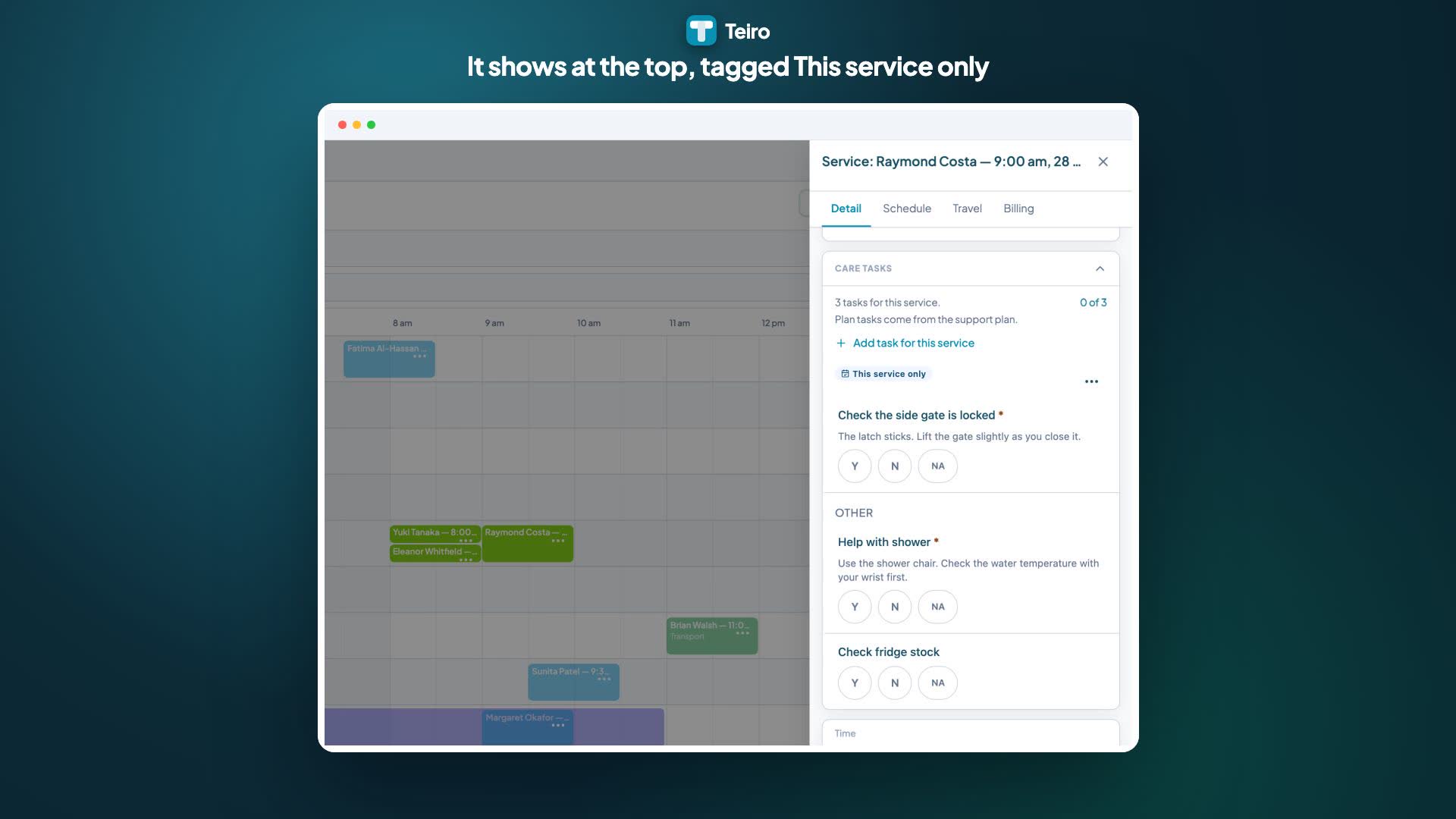
A coordinator opens a service on the scheduler and adds a one-off task such as checking the side gate is locked, with instructions. The carer sees it at the top of their task list tagged This service only and answers it. Once answered, the task is locked.
Watch the walkthrough
Who can do what
- Admins, coordinators and schedulers can add, edit and remove one-off tasks.
- Team leaders cannot add, edit or remove them.
- Carers see one-off tasks on their shift and answer them. They cannot add, edit or remove them.
Add a one-off task
You can add one from either of two places. Both use the same Care Tasks section.
- The service record. Open the service from the customer's record or the scheduler, and look for Care Tasks on the Detail tab.
- The scheduler. Click the service on the board to open its side panel. The Care Tasks section is in the panel.
Then:
- 1.In Care Tasks, choose Add task for this service.
- 2.Type the Task. Keep it short and clear, up to 80 characters. For example, "Check the side gate is locked".
- 3.Optionally add Instructions, up to 280 characters. Use this for anything the carer needs to know to do it properly.
- 4.Leave Required switched on if the carer is expected to answer it. If it is still unanswered at check-out, they are warned, but they can still check out. Switch it off if it is a nice-to-have.
- 5.Choose Add task.
The task appears at the top of the service's task list, above the support plan tasks. The sheet reminds you that it is only for this service and does not change the support plan.
A customer does not need a support plan for this to work. If they have no plan, or their plan has no tasks, you can still add a one-off task to a service. The Add task for this service button also shows in the empty state.
What the carer sees
On their shift, the carer sees your task at the top of their task list with a This service only tag, so they can tell it apart from the tasks that come from the support plan.
- They answer it the same way as any other task: Yes, No or N/A.
- If it is Required and it is still unanswered when they check out, they get the same warning as for any other required task.
- Carers cannot change or remove it. If something about it is wrong, they tell the office.
Edit or remove a task
Open the three-dot menu on the task's row and choose Edit task or Remove task. Removing asks you to confirm, and the carer will no longer see the task on that service.
You can edit or remove a task until a carer has answered it. Once it is answered it is locked and the row shows Locked once answered. This keeps the record of what the carer was asked and what they said. If you open the editor just as a carer answers, Teiro tells you it can no longer be changed.
You also cannot add or change tasks on a service that is already completed or cancelled.
Recurring services
If the service repeats, a one-off task is added to that one occurrence only. The other services in the series are not changed. If you want the same task on next week's service, add it there too. Teiro does not copy one-off tasks to other services.
If something needs to happen on every service, or on a regular pattern, it belongs in the support plan instead. See Managing support plans.
The activity log
Adding, editing and removing a one-off task is recorded in the service's activity, so you can see who changed what and when.
What one-off tasks do not do
- Carers cannot add their own tasks.
- A task cannot be copied to other services or saved as a template.
- Teiro does not send the carer a notification when you add a task. If you add one close to the start of a shift, let the carer know directly.
- Tasks cannot be added while you are creating a service. Create the service first, then add the task.
Related
- Managing support plans
- What carers see: support plan tasks on a shift
- Support plans and client records
Ready to see it with your own customers? Book a demo or start free.
Related articles
Managing support plans
Create a support plan for a customer, add the tasks carers should do on their shifts, and make it current. Includes version history and what carers see.
Support plan tasks on a shift
What a support worker sees from the customer's support plan on each shift, and how to answer the tasks.
Checking in and out of a job
How carers check in at the start of a visit and check out when they leave.