
How to Turn a Support Plan Into Tasks Carers Actually Do on Shift
A practical guide for NDIS and Support at Home coordinators: why plans in a PDF do not change what happens on shift, how to write task-level plans, when to use a one-off task or a plan revision, and how Teiro puts the plan on the shift.
Most providers have a support plan for every participant. Far fewer can say, for a given Tuesday morning, what the carer at the door was actually told to do. The plan sits in a PDF or a shared drive, the carer has never opened it, and the real instructions travel by text message and memory.
This guide is for coordinators who own that gap. It covers why the gap opens, how to write a plan that a carer can follow on shift, how to handle changes without losing the thread, and how Teiro puts a plan's tasks on the shift itself.
A note on terms. This guide is about the provider's own plan of what carers do on their shifts. It is not the NDIS plan that a participant's funding sits under, and not a funding or budget plan. NDIS providers usually call it a support plan. Many Support at Home and aged care providers call it a care plan. In Teiro it is labelled "Support plan" on screen.
The problem: the plan and the shift are two different documents
Three things tend to go wrong, and they are connected.
The plan lives somewhere carers do not look. A plan in a PDF is written once, at intake, and read by the person who wrote it. A carer rushing between visits will not open a 12 page document before walking in. What they act on is what they can see at the moment they need it.
Tasks drift from the plan. Over months the real routine changes. The shower moves to the afternoon. A family member asks for the bins to go out. A new carer is told something verbally. None of it makes it back into the plan, so the plan describes a participant who no longer exists.
Nobody can reconstruct what a carer was told on a given day. When a family member, a funder, a quality reviewer or an auditor asks "what was the carer asked to do on 14 March, and what did they say they did?", the plan alone cannot answer it. You need to know which version of the plan was current that day, which tasks applied to that shift, and what the carer recorded against them.
The fix is not a better document. It is to make the plan a list of tasks that is tied to shifts, so that what the carer sees is generated from the plan rather than copied from it.
How to write a plan carers can follow
A task-level plan is shorter and more specific than a narrative plan. These are the decisions worth making for every task.
Write each task as one action
"Assist with personal care" is a category, not a task. "Assist with shower" is a task. If a carer could tick it and a coordinator could later ask "did that happen?", it is the right size. If it contains the word "and", it is probably two tasks.
Say when it applies
For each task, decide:
- Which service it belongs to. A shower belongs on a personal care shift, not a cleaning shift.
- Which days. If it is every day, say so. If it is Monday, Wednesday and Friday, say that.
- What time of day. A morning medication prompt and an evening one are different tasks with different windows.
- How often. Every visit, once a day, weekly, fortnightly or monthly. Be honest about this one. "Check the smoke alarm" is monthly, not every visit, and a task that appears on every shift gets ignored on every shift.
Mark what is required
Some tasks are the point of the visit: the shower, the meal, the prompt for a particular activity. Others are worth doing if there is time. Mark the difference. If everything is required, nothing is, and the carer cannot tell what a coordinator would be unhappy to find undone.
Put the how in the instructions
The task says what. The instructions say how this person likes it done: which products, which order, what to avoid, who to call if something looks wrong. Keep them to a few lines. If you need a page, the task is really a separate document, such as a specialist plan, and the task should point to it.
Keep the plan for what repeats
A support plan is for the things that happen on a pattern. Everything else belongs elsewhere, and the sorting is what keeps the plan trustworthy.
- A request for one visit ("check the side gate, the neighbour mentioned it was left open", "a parcel is arriving today") is a one-off task on that visit. It should not touch the plan.
- A change that lasts ("she now needs two people for transfers", "swap the morning shower to evenings") is a plan change.
- Something that is wrong with the plan itself is also a plan change. Do not fix it with a string of one-off tasks.
The test is simple: if you would want it to happen again next week without anyone remembering to ask, it belongs in the plan.
When needs change after a hospital stay
A return from hospital is where plans most often fall out of date. Discharge often brings new equipment, new risks, a changed routine and a different level of help, all at once, usually for a participant who is tired and not at their best.
A practical approach:
- 1.Revise the plan, do not patch it. Make the changes in one go, with the discharge information in front of you, rather than as a series of verbal updates.
- 2.Review every task, not only the ones you expect to change. Showers, meal preparation, transfers and anything involving mobility are the usual suspects. Tasks that were optional may now be essential.
- 3.Be specific about what is temporary. If the new arrangement is for four weeks, say so in the task instructions and set yourself a prompt to revise it again. A temporary arrangement with no end date becomes the permanent plan by accident.
- 4.Keep the earlier version. The plan that applied before the admission, and the one that applied after, are both part of the record. Do not overwrite the first with the second.
- 5.Tell the carers who are on shift soon. Whatever system you use, a change on paper is not a change in practice until the carer has seen it.
How Teiro does it
Teiro is built around this task-level approach. The plan is not a document that carers are expected to read. It is a list of tasks on the customer's record, and each task shows up only on the shifts it applies to.
The plan is the task list
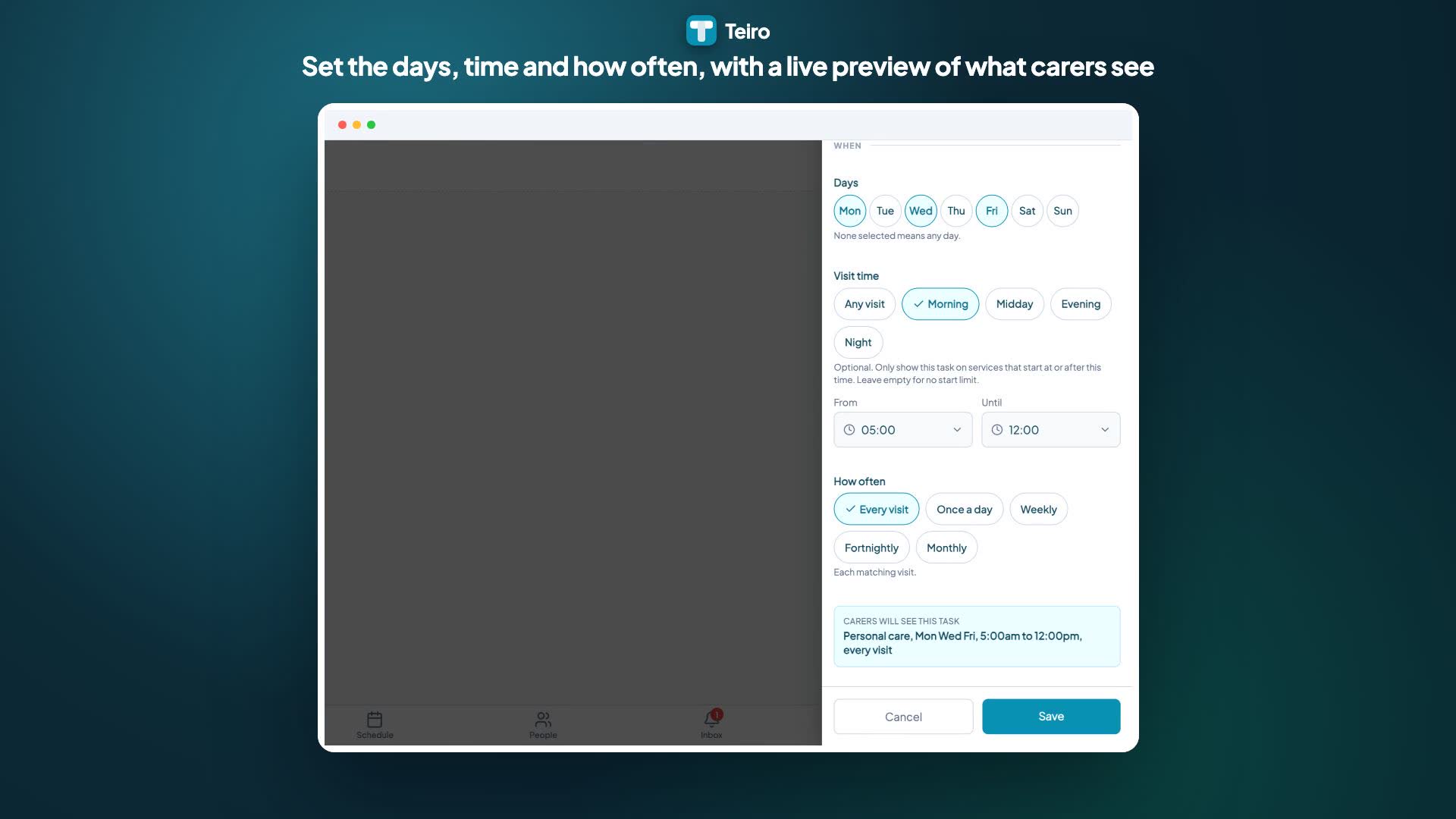
A coordinator opens the customer's record and creates a support plan from the Support plan tab. It starts as a Draft that carers cannot see, so it can be built at whatever pace the intake allows. Each task has a label, instructions, an optional service type, the days it applies to, a time window, a frequency (every visit, once a day, weekly, fortnightly or monthly) and a required or optional setting. As the rule is set, Teiro shows a plain English line starting "Carers will see this task", so the coordinator can read the rule back before saving it.
When the plan is ready, Make current puts it live. If the customer had a current plan, it becomes a previous version. Nothing is deleted.
The shift shows the right tasks
Carers do not get a plan to read. They open their shift and see the tasks from the current plan that match it: the service type, the day, the time of day and the frequency. They answer each one Yes, No or N/A. A required task that is still unanswered at check-out triggers a warning, though the carer can still check out. Carers see only the tasks for their shift, not the whole plan, and cannot change it.
A task that is not done on its shift does not carry to a later one. If a weekly or monthly task is missed, a coordinator needs to follow it up.
Requests for one visit stay out of the plan
A coordinator can add a one-off task to a single service, from the service record or from the scheduler. The carer sees it at the top of the list, tagged This service only, alongside the plan's tasks. It works even if the customer has no plan, and it can be edited or removed until a carer answers it. After that it is locked, so the record of what the carer was asked stays intact. On a recurring service it applies to that one occurrence only.
Changes become new versions
A current plan is locked. To change it, a coordinator chooses Revise plan, which copies the plan and its tasks into a new draft. After the changes are made, Make current moves the old plan to previous versions and carers pick up the new tasks on the shifts they match. Tasks a carer has already answered stay on that shift with the answer and the task as it was worded when it was answered, even if the plan changes afterwards.
That is what lets you answer "what was the carer asked to do on 14 March?": the version of the plan that was current, the tasks that matched that shift, and the carer's answers are all kept.
 1:26
1:26Watch
How to Build a Support Plan with Tasks That Carers See on Shift in Teiro
A coordinator creates a support plan for a customer, adds tasks with their own days, time window and frequency, and makes the plan current. The carer then opens their shift and sees only the tasks that match it, and ticks one off.
Watch the walkthrough
What Teiro does not do yet
To keep expectations realistic, support plans in Teiro do not currently include review reminders, digital sign-off or client signatures on the plan, uploading a PDF into the plan, goals or outcomes tracking, a side-by-side comparison of versions, or access for clients and guardians. Teiro will not tell you what changed between two versions, so open both and compare them. If you keep a signed plan or a goals document elsewhere, you can attach it to the customer's documents.
Teiro also does not send a carer a notification when you add a one-off task. If you add one close to the start of a shift, tell the carer directly.
A short checklist for your next plan
- Is every task a single action a carer could tick?
- Does every task say which service, which days and what time of day it applies to?
- Is the frequency honest, rather than "every visit" by default?
- Are the genuinely essential tasks marked required, and only those?
- Do the instructions say how this person likes it done?
- Is anything in the plan really a one-off request that should be on a single visit?
- Has anything changed recently that the plan does not yet reflect?
- Can you tell, for any past shift, which version of the plan was in force?
Frequently asked questions
Does a support plan have to be a list of tasks?
Not necessarily. Providers also hold goals, risks, preferences and specialist plans, and many keep those in separate documents. The point of a task-level plan is the part that carers act on during a shift. Keep it short and specific, and keep the broader plan document alongside it.
What is the difference between a support plan and a care plan?
In practice they are the same thing under different names. NDIS providers tend to say support plan, and Support at Home and aged care providers tend to say care plan. Teiro labels it "Support plan" on screen, and this guide covers both. Neither is the same as the NDIS plan that a participant's funding sits under.
When should I use a one-off task instead of changing the plan?
Use a one-off task for something that is needed on a single visit and does not need to happen again. If it should happen on a pattern, put it in the plan. Adding the same one-off task to several visits is a sign it belongs in the plan.
What happens to a shift's tasks if I change the plan mid-week?
In Teiro, tasks a carer has already answered stay on that shift with their answers. Tasks not yet answered follow whichever plan is current. A task that was due earlier in the week and has not been done does not move to a later shift.
Can carers see the whole support plan in the app?
No. In Teiro carers see the tasks from the current plan that match their shift, and they cannot see drafts or edit the plan. If a full plan document needs to be read, attach it to the customer's documents and tell the carer where it is.
Does Teiro remind me when a plan is due for review?
Not today. Review reminders are not part of support plans in Teiro yet, so keep your own review dates until they are.
Related
- Managing support plans: the step by step guide for coordinators
- Support plan tasks on a shift: what a carer sees and does
- Add a one-off task to a single service
- Client records and support plans
- NDIS support plan template
Book a demo to see it on your own customers, or start free for up to five active users.