
Delete a service entered by mistake, or archive it
Last updated
How to delete a duplicate or wrongly entered service in Teiro, who can do it, when Delete is offered, and when to archive instead. Deleted services leave your schedules and reports and stay in the audit log.
Can I delete a service I entered by mistake?
Yes. If a service was a duplicate, was booked for the wrong client or the wrong date, or should never have been entered, admins and coordinators can delete it. It disappears from schedules and reports, and it stays in the audit log with the reason you gave. Carers cannot delete services.
Delete is only offered when nothing real has been recorded against the service. If something has, Teiro keeps the Archive option instead. Both are explained below.
Delete a service
- 1.Open the service from the Schedule board, or from the client's Schedule tab.
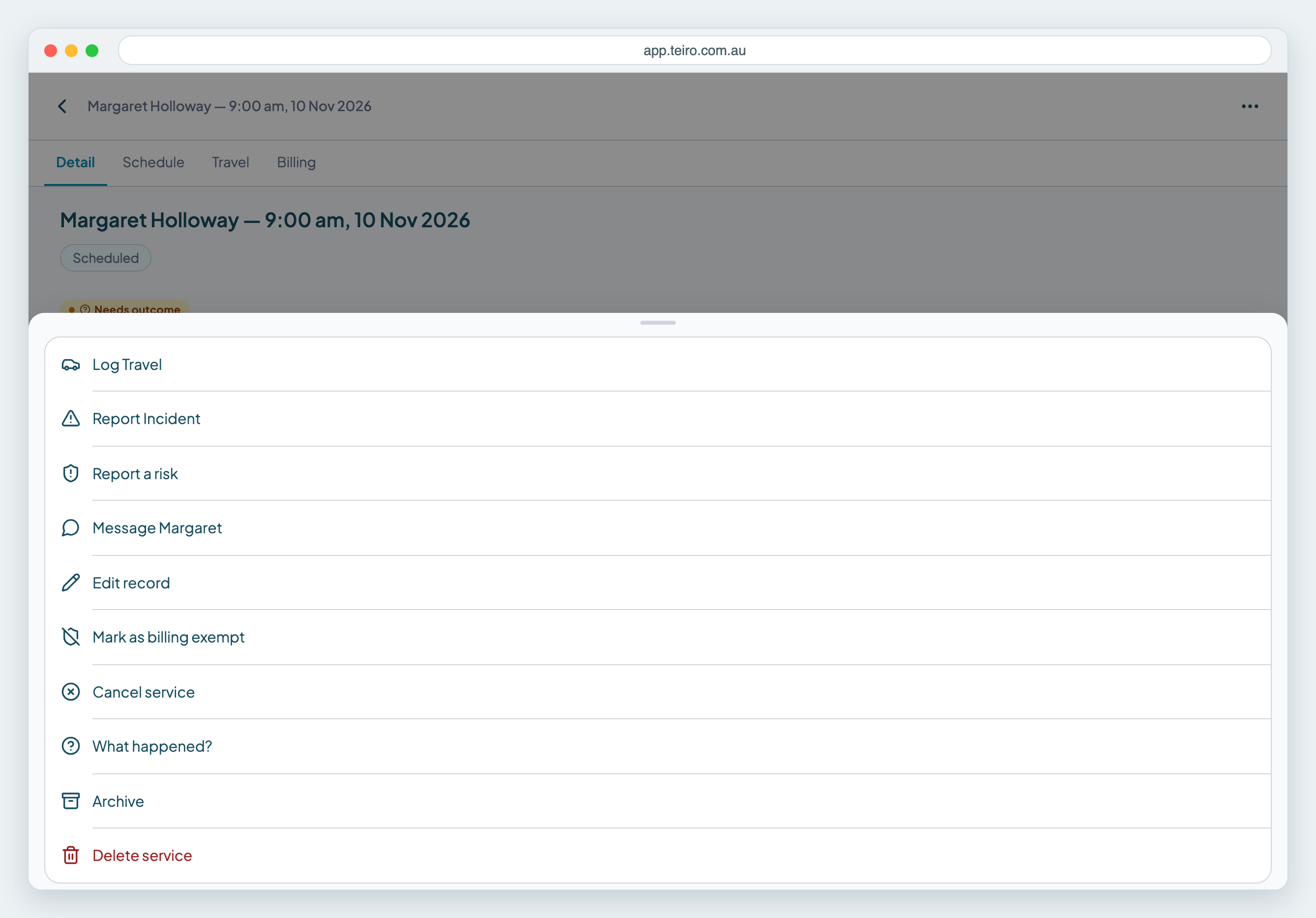
- 2.Tap "..." at the top right.
- 3.Choose Delete service. It is the red option at the bottom of the menu.
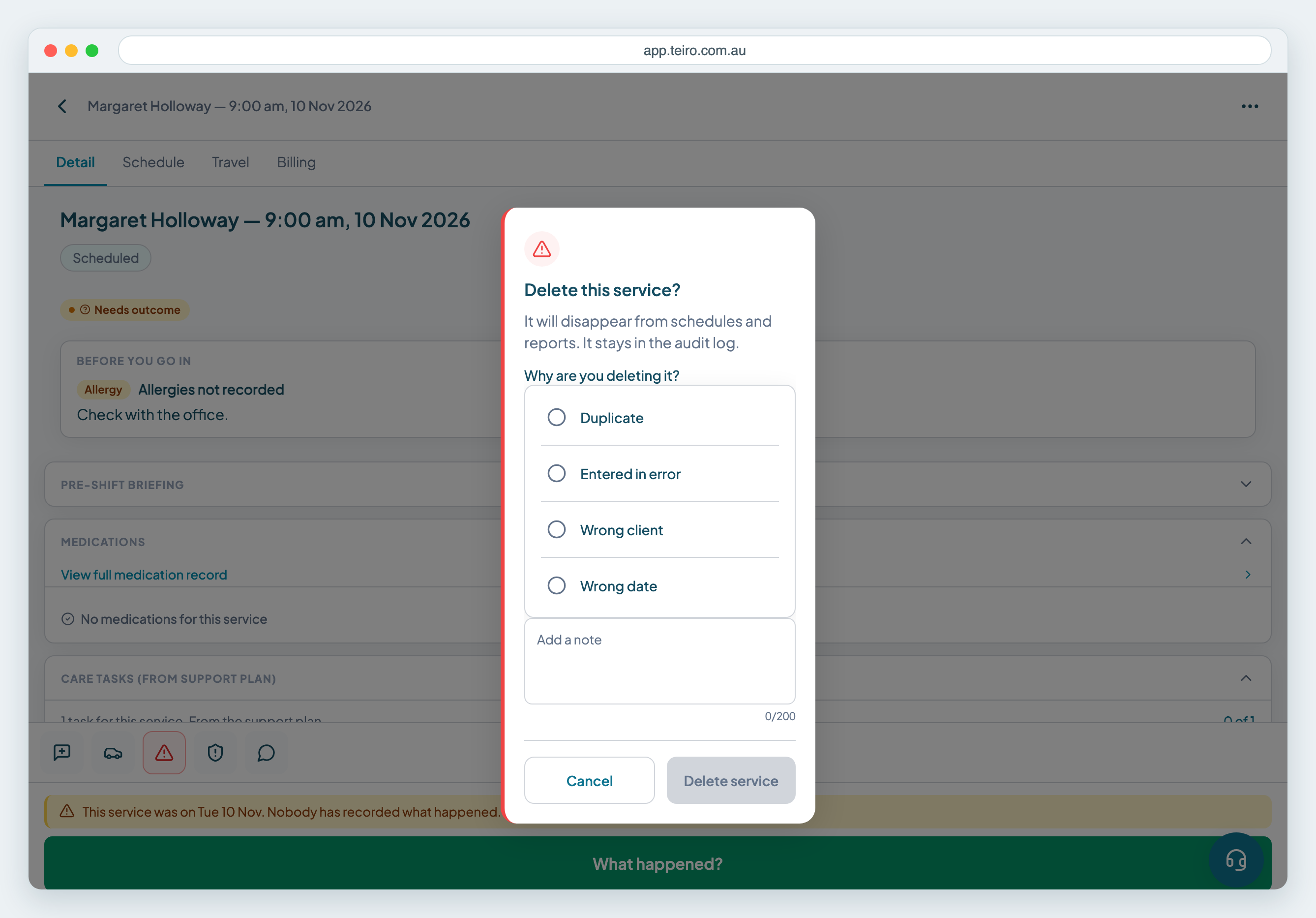
- 1.Choose a reason: Duplicate, Entered in error, Wrong client or Wrong date. Nothing is chosen for you, and the Delete service button stays greyed out until you pick one.
- 2.Add a short note if it helps. The note is optional and holds up to 200 characters.
- 3.Tap Delete service.
The service is gone from the board, the client's schedule and your reports. Teiro keeps the deletion in the audit log with the reason, so you can always see who removed it and why.
When is Delete offered?
Delete is offered for a service that is in the past, cancelled, or had its times entered by an admin or coordinator, as long as none of these exist on it:
- Notes or other records attached to the service
- Documents
- Billing
- Attendance recorded by a carer, such as a check-in or check-out they made themselves
A service that was never attended, a duplicate booked for last Tuesday, or a past service entered for the wrong client usually qualifies. A service a carer actually worked, or one that has already been billed, does not.
What to do when Delete is not offered
Use Archive. It is in the same menu. Archive takes the service off the roster, alerts and billing, and keeps the record. Teiro explains why Delete is not available, for example "This service has notes, so it can only be archived."
If you opened Archive first and Delete is available, the dialog shows a Delete instead button, so you can switch without closing it.
Delete, archive or cancel?
- Delete is for a service that should never have been entered. It leaves schedules and reports.
- Archive is for a service that has history you need to keep. It leaves the roster and billing, and the record stays.
- Cancel is for a visit the client expected that did not go ahead. It stays on the roster marked Cancelled and counts in cancellation reports. See How to cancel or delete a service in Teiro.
If the whole repeating series was set up wrongly, use Manage series and Remove future occurrences. That is covered in How to cancel or delete a service in Teiro.
Frequently asked questions
Who can delete a service in Teiro? Admins and coordinators can. Carers cannot.
Is a deleted service gone for good? It disappears from schedules and reports, but it stays in the audit log with the reason you chose.
Why is there no Delete option on my service? Delete only appears when nothing has been recorded against the service. If it has notes, documents, billing or attendance a carer recorded, you can archive it instead.
What is the difference between Archive and Delete? Archive takes the service off the roster, alerts and billing and keeps the record. Delete is for services entered by mistake and removes them from schedules and reports.
Next steps
Ready to see this against your own roster? Book a call or start free for up to five active users.
Related articles
How to Cancel or Delete a Service in Teiro
How to delete a service you set up on repeat, cancel a single visit, or move a service to a new time. Cancel and Remove do different jobs, and this page shows which to use.
Using the Scheduler Board
The board shows each carer as a lane and each service as a block. Switch between Day and Week, drag a service to another carer and clear the Unassigned lane.
How to view the audit log for a record
See the full change history for any record in Teiro -- who changed what, when, and what the value was before and after.
Managing recurring jobs
Set Repeat in the New Service form to create a daily, weekly, fortnightly or monthly series. This covers editing one visit or the whole series, and cancelling or removing a repeating service.