
What SIRS incident reporting software has to do
Under SIRS your incident management system covers incidents that have caused, or could reasonably have been expected to cause, harm (Aged Care Rules 2025, s164-10). You decide which are reportable, decide whether each is Priority 1 or Priority 2, and notify the Aged Care Quality and Safety Commission through the My Aged Care provider portal. Priority 1 is 24 hours from becoming aware. Priority 2 is 30 calendar days. The software job is to make sure the record exists the moment someone knows, the right person sees it, and the deadline does not depend on anyone remembering it.
When you compare tools, ask:
- Does it capture the incident at the point of care, with the client and visit already attached, rather than as an email or a phone call later?
- Does it separate what the carer saw from the decision about reportability and priority, which belongs to a reviewer or delegate?
- Does it hold the SIRS priority and show a deadline that follows it, 24 hours for Priority 1 and 30 calendar days for Priority 2?
- Does it record when and how you notified, and keep the reference number against the incident?
- Does it cover non-reportable incidents too? The Aged Care Rules 2025 (s164-10) require your incident management system to cover incidents that have caused, or could reasonably have been expected to cause, harm, not only the reportable ones.
- Does it keep an audit trail of who changed what and when?
What Teiro does for incidents and SIRS
This is the incident workflow as it works in the product today.
Carers report from the shift
A Report Incident button sits on the shift and on the client record, so the client and the service are already attached. The carer fills in a short, facts-only form: what happened, when, where, who was involved, whether anyone was hurt and what they did straight away. Photos and files can be added. One switch lets a carer raise a safeguarding concern without naming anyone.
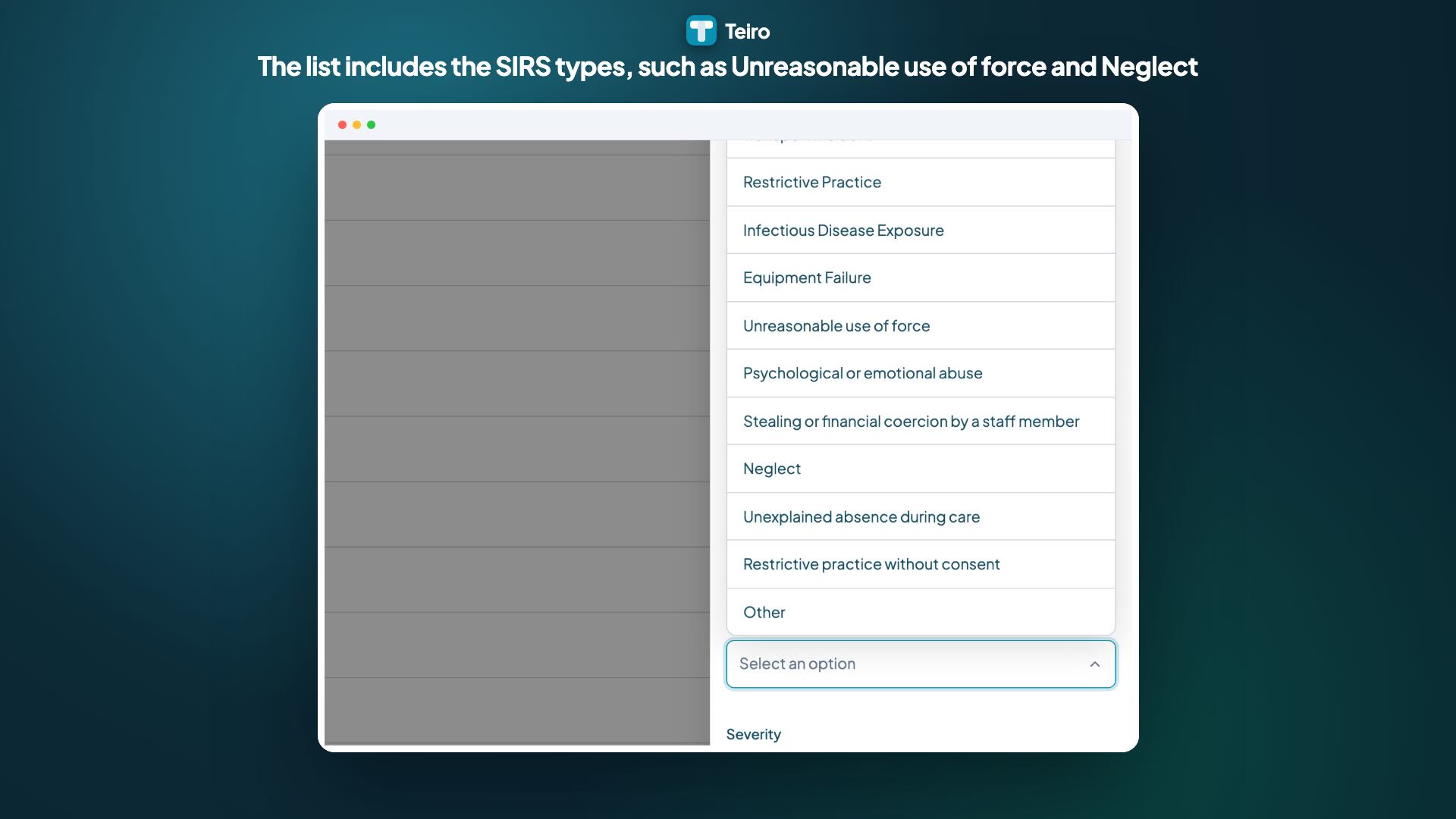
The eight SIRS types are in the incident type list
Incident Type includes the SIRS types: unreasonable use of force, unlawful sexual contact, psychological or emotional abuse, unexpected death, stealing or financial coercion by a staff member, neglect, inappropriate use of a restrictive practice, and unexplained absence during care. Choosing a type records what happened. It does not decide whether the incident is reportable.
A reviewer sets reportability and priority
The reviewer decides whether the incident is reportable to the ACQSC (and, separately, to the NDIS Commission for providers who serve both cohorts) and sets the ACQSC SIRS Priority to Priority 1 or Priority 2. Carers do not see the priority field. A new report goes to the client’s care partner as reviewer where they hold incident review permission, and people with that permission are told straight away.
Notification Due fills in from the priority
Once a priority is set, Notification Due shows 24 hours for Priority 1 and 30 days for Priority 2. Teiro counts from when the report was created in Teiro, so create the report as soon as the incident is known. The scheme counts from when your organisation became aware, so if the report is created later than that, the date Teiro shows is later than your real deadline.
You record the notification you lodged
After you lodge in the My Aged Care provider portal, you record Date/Time Notified, ACQSC Notified At and the ACQSC Reference Number on the incident. Once Date/Time Notified is filled in, Notification Due stops changing, so a later edit cannot rewrite whether the deadline was met.
Closing is gated and every change is logged
An incident cannot be closed without an outcome, and corrective actions have their own fields. Every state change is written to an audit trail, which is the record an auditor or the Commission asks for.
Watch: recording a SIRS incident
A one minute walkthrough of choosing a SIRS incident type, setting Priority 1, reading Notification Due and recording the notification. Written steps are in the help article.
 1:06
Watch
How to Record a SIRS Incident and Track Its ACQSC Notification Deadline in Teiro
How an aged care provider records a Serious Incident Response Scheme (SIRS) incident in Teiro: pick a SIRS incident type, set the funding context to Aged Care, mark it reportable to the ACQSC at Priority 1, read the Notification Due deadline, then record when the notification was made.
Watch the walkthrough
What Teiro does not do
Teiro does not decide whether an incident is reportable and does not submit notifications to the ACQSC or the NDIS Commission. A person in your organisation makes the call and lodges the notification in the My Aged Care provider portal. Teiro makes sure the facts are recorded when someone first knows, the decision is made by the right person, the deadline is visible and the outcome is logged.
First aid and safety come before the app. Make the person safe, call 000 if needed and phone your on-call coordinator. Logging the incident is the last step, not the escalation.
Free SIRS tools you can use today
Frequently asked questions
Does Teiro submit SIRS notifications to the ACQSC for me?
No. Teiro records the incident, the priority and the Notification Due deadline, and you record the notification once you have lodged it in the My Aged Care provider portal. Teiro does not submit to the portal on your behalf.
Does Teiro decide whether an incident is reportable or which priority applies?
No. A reviewer or delegate in your organisation decides reportability and sets the priority. Teiro records that decision with the facts attached and then tracks the deadline. The free SIRS decision tool and guide on this site can help your delegate think it through, but they are decision support, not a determination.
Can Teiro track the Priority 2 deadline of 30 days?
Yes. Set ACQSC SIRS Priority to Priority 2 and Notification Due shows 30 days, counted from when the report was created in Teiro. The scheme counts from when your organisation became aware, so create the report as soon as the incident is known.
Does it work for home care and Support at Home providers, not only residential?
Yes. Carers report from the mobile app on a shift or from the client record, which suits home and community care. SIRS applies to services in home or community settings as well as residential care homes.
We also deliver NDIS supports. Can one system handle both?
Yes. Reportability to the ACQSC and to the NDIS Commission are tracked as separate fields on the same incident. NDIS and SIRS are different schemes with different timeframes, and Teiro’s Notification Due follows the SIRS priority for aged care incidents and a flat 24 hours from the reported time where no SIRS priority is set. It does not apply the NDIS Commission’s 5 business day timeframe, so confirm NDIS deadlines separately.
Primary source
This page is based on guidance published by the Aged Care Quality and Safety Commission (ACQSC) under the Aged Care Act 2024 and the Aged Care Rules 2025, in force from 1 November 2025.